AI Training for Business: A Practical Guide to Real Results
ai training for businessbusiness ai trainingai upskillingai for smeworkforce ai training
Most advice about AI training for business starts in the wrong place. It treats training like a prompt-writing class, when the problem in most SMEs is that people don't know what to change, who owns the change, or how to make AI fit the work already happening in inboxes, CRMs, spreadsheets, and client calls.
That's why so many teams finish a lively workshop, then drift straight back to old habits. They've seen good demos, maybe learned a few useful prompts, but the workflow stays the same, the review step stays unclear, and the manager still can't tell whether AI is helping or just creating more noise.
The UK evidence backs that up. The Office for National Statistics found that among businesses with 10 or more employees, around 62% of firms that said a lack of AI expertise was a barrier reported training or retraining existing staff, compared with around 26% of firms that didn't report barriers, and businesses most often handled AI skills needs internally rather than by outsourcing (ONS analysis of AI in UK businesses, 2023 to 2026). That's a clear sign that capability gaps are being tackled inside the business, not solved by buying a generic course and hoping for the best.
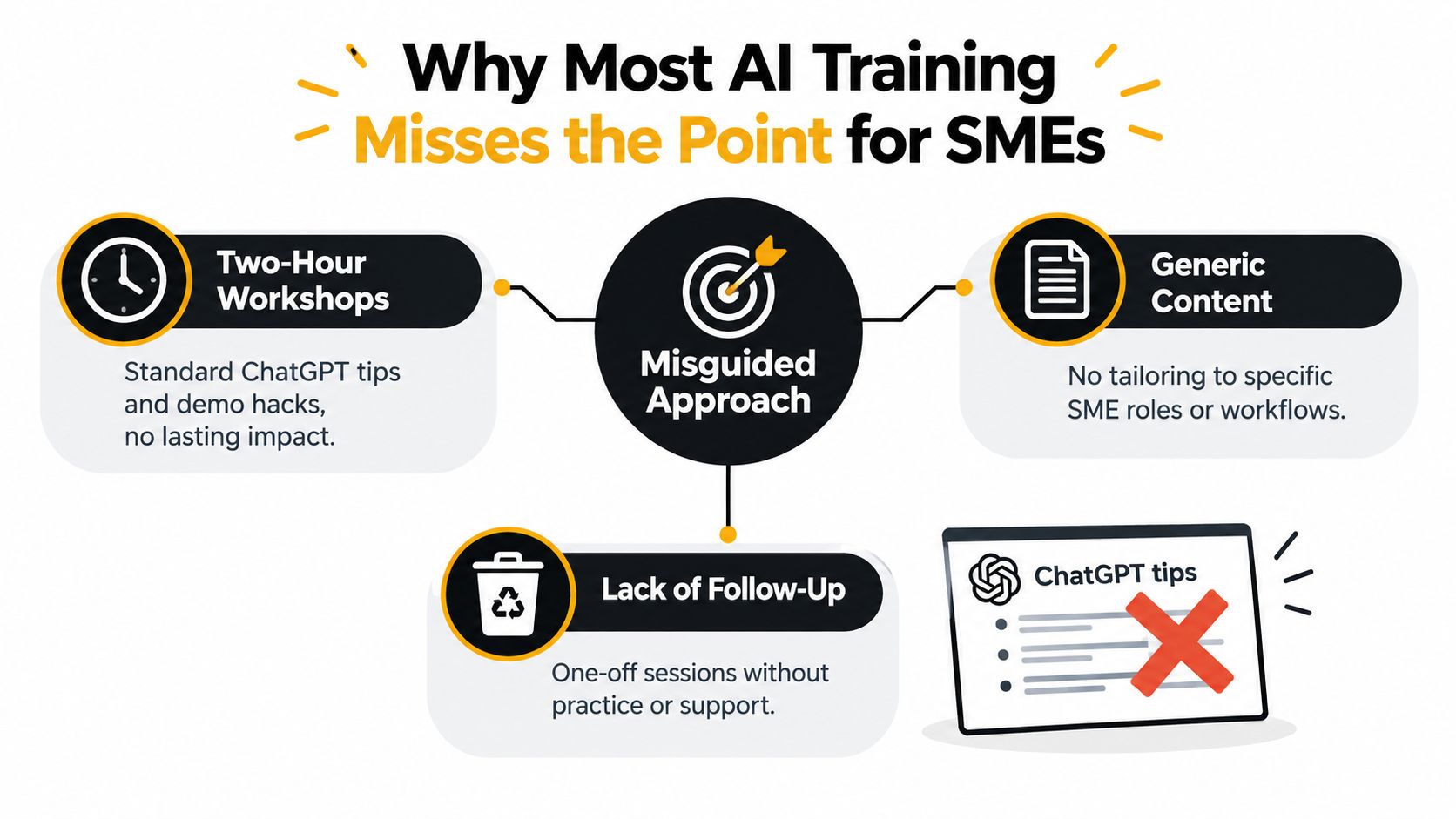
Table of Contents
- Why Most AI Training Misses the Point for SMEs
- What AI Training for Business Actually Means
- Choosing the Right Training Format for Your Team
- Designing a Curriculum Around Real Roles and Workflows
- What Good Applied AI Training Looks Like in Practice
- Measuring Whether AI Training Actually Worked
- A 90-Day Plan to Roll Out AI Training
- Common Questions UK SMEs Ask Before They Start
Why Most AI Training Misses the Point for SMEs
The common mistake is teaching tools instead of work
Most SME training packages still look like a two-hour workshop with a few ChatGPT tips, a list of model names, and some demo prompts. That can create energy, but it rarely creates adoption, because the team leaves without a changed process, a clear owner, or a practical way to keep using the new skill on Tuesday morning.
A better way to think about AI training for business is as a workflow problem. A sales coordinator doesn't need a lecture on model families, they need a repeatable way to draft follow-up notes, sanity-check outputs, and hand the result into the CRM without creating extra admin. An operations lead doesn't need more AI vocabulary, they need a safer, faster way to handle recurring tasks inside existing systems.
Practical rule: if the training doesn't change a live workflow, it's probably entertainment, not enablement.
The ONS finding matters here because it shows UK businesses with AI barriers are more likely to retrain existing staff, and that internal handling is the common response to AI skill needs (ONS analysis). That lines up with what happens on the ground in SMEs. AI gets useful when operational teams can use it, not when a specialist knows the theory.
The failure modes are usually managerial, not technical
The biggest blockers are often dull, not dramatic. No one owns the workflow, the data is messy, the team is unsure what's safe to paste into a public tool, and nobody comes back after the trainer leaves to check whether the method stuck. That's why one-off delivery so often underperforms.
The wrong question is, “Which prompts should everyone learn?” The better question is, “Which recurring tasks should be redesigned, and who needs to own the new version of the task?” Once that question changes, the training brief changes too. You stop buying tips and start building capability.
What AI Training for Business Actually Means
A useful definition for SMEs
AI training for business is structured enablement that changes how people do their work, not just how they talk to a chatbot. It's closer to onboarding a new operations system than attending a software demo.
A good trainer doesn't just show staff how to type a request into an AI tool. They show the team how to prepare inputs, what the AI should do, where a human must review, and what the final output should look like before it goes into the customer journey, the sales pipeline, or the finance process.
That means the training needs to cover more than prompts. It has to cover tool literacy, workflow patterns, governance, and the human judgement needed to use AI responsibly. Without all four, teams get fragments, not capability.
The four layers that actually matter
The first layer is tool and model literacy. People should know enough to choose the right tool for the task and understand its limits. The second is prompt and workflow patterns, where they learn how to ask for the right output and where AI fits inside a real sequence of work.
The third layer is governance and data handling. Staff need to know what can be shared, what has to stay out of public tools, and when a human review step is mandatory. The fourth is the softer but more important layer in many SMEs, process redesign. If the workflow doesn't change, the training won't stick.
Good training leaves behind artefacts people keep using, not just notes from a session. That might include a role-specific prompt library, a reviewed output template, or a short playbook for how a team handles a repeated task. A one-off demo won't do that. Neither will generic vendor certification if it never touches the business's actual documents, customers, or systems.
The goal is reliability and repeatability. If the team can get a useful result once, that's interesting. If they can get a good result every week with the same standard of review, that's training that's doing real work.
Choosing the Right Training Format for Your Team
Match the format to the problem, not the trend
SMEs tend to buy training in the format that sounds easiest to procure. That's how they end up with content that's polished but disconnected. The smarter move is to choose the format that fits the size of the team, the urgency of the use case, and how much support people will need after the first session.
| AI training formats compared for UK SMEs | Typical cost | Time to first applied use | Role-specific depth | Ongoing support |
|---|---|---|---|---|
| In-person workshop | Moderate | Fast, if the use case is ready | Medium | Low unless followed up |
| Live virtual cohort | Moderate | Fast to medium | Medium to high | Medium |
| On-demand video library | Lower upfront | Slow | Low | Low |
| Self-serve documentation | Low | Slow | Low | Low |
| Embedded coaching in a pilot | Higher upfront | Fast | High | High |
| Train-the-trainer programme | Moderate to higher | Medium | High over time | High if internal owners stay active |
For a team of fewer than fifteen people with one clear workflow, embedded coaching usually makes sense. The trainer works alongside the team while the work is live, so people can test outputs, adjust prompts, and fix the workflow before habits harden. If the issue is governance or baseline awareness across the company, a live workshop plus documentation is a better fit.
When self-serve works, and when it doesn't
Self-serve content can be useful once people already know what they're trying to do. It's a weak choice for first deployment, though, because completion without structure is often poor and nobody knows whether the material turned into behaviour. Moving teams usually do better with on-demand content plus a weekly clinic, because they can learn asynchronously and still bring real problems back into a live setting.
Simple rule: the more uncertain the workflow, the more human support you need around the training.
Content depth matters more than delivery prestige. A plain workshop that uses your own documents, your own approval steps, and your own quality standards will beat a glossy course that talks about AI in general terms. Mixing two formats often works best, for example, a live kick-off and a short internal library for reinforcement.
Designing a Curriculum Around Real Roles and Workflows
Start with bottlenecks, not competencies
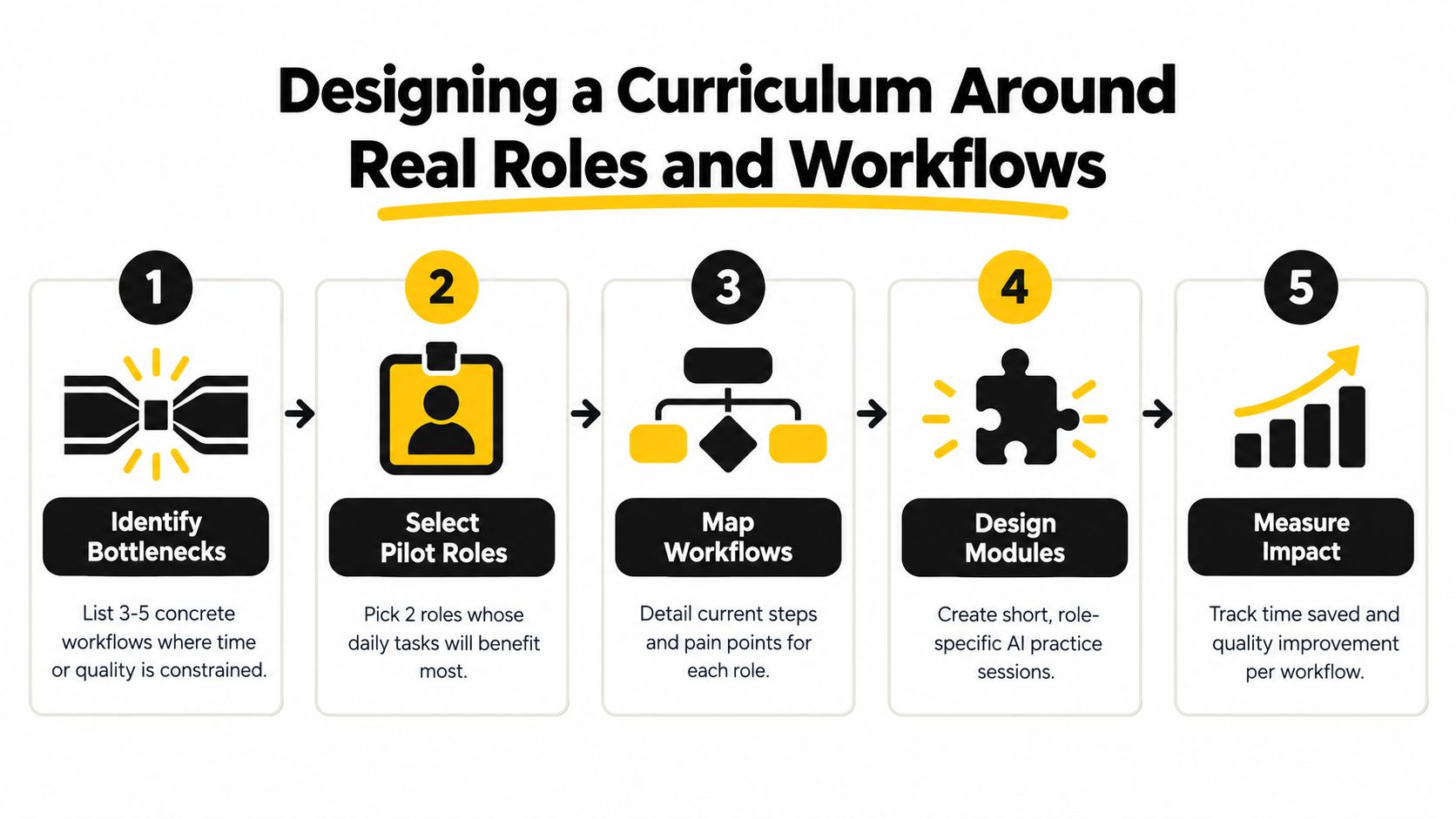
A role-first curriculum beats a competency matrix because it starts where time is being lost. Pick three to five workflows where the team feels pain today, such as drafting client proposals, summarising sales calls, triaging support tickets, or preparing management updates.
For each one, write down four things. The input, the AI-assisted step, the human review step, and the measurable output. That sounds simple, but it forces clarity. If nobody can define the review step, the business is not ready to trust the workflow.
The role grouping should be practical, not hierarchical. Sales, operations, finance, and marketing usually need different training even when they sit at the same seniority level. A director and a coordinator might share a tool, but they rarely share the same workflow.
Build the curriculum in two tracks
The first track is a foundation module. It covers data hygiene, prompt patterns, privacy guardrails, and how to judge whether an output is usable. Keep it short and practical, because this is the part everyone needs before they touch live tasks.
The second track is role-specific. Use the team's actual templates, emails, call notes, spreadsheets, and customer records, where appropriate, as the training artefacts. That's where real adoption starts, because people practise on familiar material instead of abstract examples.
A simple weekly office hour helps the work survive the first month. People bring live tasks, show where the output failed, and the group improves the method together. Anything that can't survive contact with a real inbox by week three doesn't belong in the curriculum yet.
The fuller way to think about the build is to tie the curriculum to the workflow design used in the AI agents use cases guide, because the point isn't just learning AI, it's deciding where AI should sit inside an operational process.
What Good Applied AI Training Looks Like in Practice
A 45-person professional services firm in Bristol does not need a theory-heavy curriculum. It needs help placing AI into the exact parts of the workflow where time disappears, and that help has to fit client work, deadlines, and review.
A week-by-week shape that holds up
In week one, the trainer shadows the sales team, the operations coordinators, and the part-time marketer for half a day each. Three real tasks per person get captured, not hypothetical exercises. That produces a working backlog of use cases the business already cares about.
Weeks two and three are where the learning happens. The cohort works through those live tasks together, rewrites prompts, stress-tests outputs, and builds a shared prompt library in a central document. People can see what works in their own role, not just in a workshop example.
By week four, each team member ships one AI-assisted workflow into production. The result is tracked in a simple time-saved log, not a complicated system nobody opens. That log matters because it ties the training to behaviour.
Why the follow-up session matters
In week six, the trainer returns for a half-day clinic. Staff bring actual outputs, failures, and awkward edge cases, then troubleshoot them together. That is often where the training becomes useful enough to keep.
If a workflow falls apart when it meets a real inbox, the problem is the design, not the learner.
Good applied training feels like working sessions anchored to the firm's own documents, customers, and constraints. It does not rely on generic sample prompts or polished fictional scenarios. It also needs a clear route into automation where that makes sense, which is why teams should explore how to build AI agents alongside the training itself. The best sessions survive because the team has already tested the method against actual work, and they know where the human review step sits.
The point is not to impress people with clever answers. The point is to produce a method that still works when the team is busy, the data is messy, and the manager wants a predictable outcome.
Measuring Whether AI Training Actually Worked
Track behaviour first, then business impact
Too many programmes report completion and call it success. That's a vanity measure. If people watched the material but didn't change their work, the training hasn't really landed.
The better approach is to separate leading indicators from lagging indicators. Leading indicators show whether people are using the method. Lagging indicators show whether the use changed the business.
| AI Training Metrics Leading vs Lagging | What to Measure | Cadence | Example KPI |
|---|---|---|---|
| Leading | Active users, logged workflows, prompt iterations, human review pass rate | Weekly for the first 90 days | More workflows being used without major rework |
| Lagging | Time saved, cycle time, proposal win quality, response speed, confidence | Quarterly | Faster delivery on the target workflow |
A baseline should be set before training begins, otherwise every improvement is guesswork. The easiest mistake is to start measuring after the team has already changed behaviour, then claim the programme caused the change. Without a baseline, you can't prove much.
Use a dashboard, not a feel-good survey
A simple shared dashboard beats a survey because logged workflows and review outcomes are harder to game. Surveys still have value, especially for confidence and friction, but they shouldn't carry the whole measurement load. If the system says a workflow is being used and the manager can see the output quality, you've got something real.
Also set an abandonment threshold. If a trained workflow isn't used at least twice a month by month three, treat it as a failed experiment and revisit the design. Don't blame the user first. Usually, the workflow needs simplification, better inputs, or a clearer handoff point.
That discipline matters because a lot of organisations confuse enthusiasm with impact. The team may like the training, but if the process never changes, the investment hasn't paid back in any practical sense.
A 90-Day Plan to Roll Out AI Training
Use a phased rollout the business can actually sustain
The first two weeks should be about discovery, not delivery. Pick two pilot roles, interview staff about bottlenecks, and define one measurable outcome for each role. If the outcome isn't clear, the rest of the plan will drift.
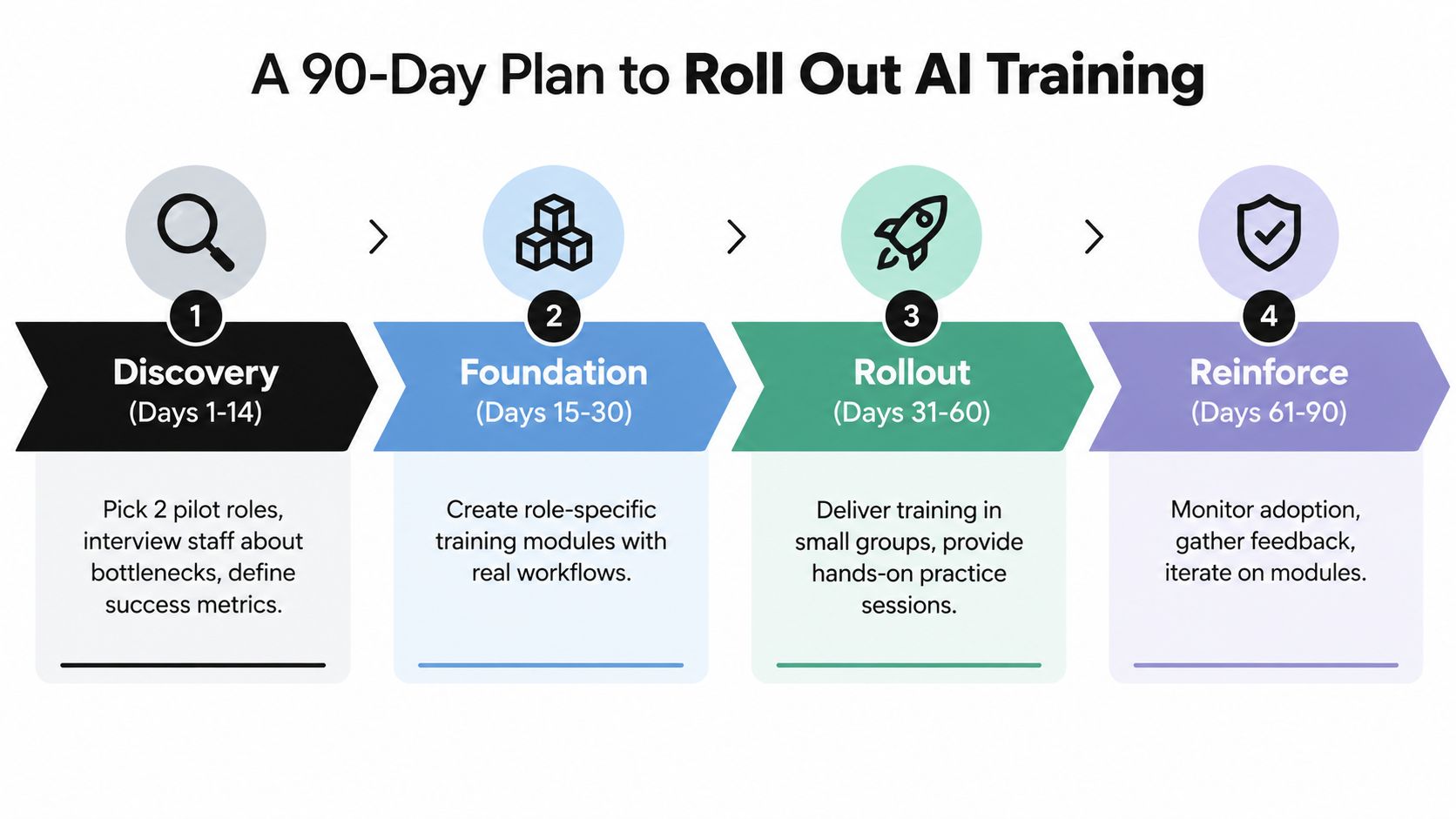
Days 15 to 45 are the foundation sprint. Build role-specific modules around live workflows, pair live coaching with templated prompts, and keep the redesign lightweight enough that people can test it without waiting for a big systems project.
Reinforce before you expand
Days 46 to 75 are for the second wave. Bring in adjacent teams, add peer champions, and formalise the guardrails around data, privacy, and human review. That's the point where training starts moving from pilot behaviour to team norm.
Days 76 to 90 should be a retrospective, not a victory lap. Calculate the productivity and quality delta, document what changed, and write the internal case for wider rollout. The temptation is to skip this part when the pilot feels promising, but that's exactly when the business should be extracting the lesson.
Keep the cadence tight: discovery, pilot, reinforce, review. If ownership gets vague at any stage, adoption slows down quickly.
The discipline here mirrors broader change management practice, and it fits well with the change management skills guide because AI training fails for the same reason many change programmes fail, people are asked to behave differently without enough structure, support, or feedback.
Common Questions UK SMEs Ask Before They Start
Do we need to hire a specialist trainer or build this ourselves?
If the business already has someone who understands the workflows, the language of the team, and the risk points, building internally can work well. If nobody can design role-specific exercises or manage the follow-up, a specialist saves time and avoids generic training that fizzles out.
What should a 20-person team expect?
Expect a pilot approach, not a company-wide transformation in week one. One or two workflows per role, a short foundation session, live practice, and a follow-up clinic will usually deliver more value than a broad but shallow rollout.
Do staff need to be technical?
No. Most workers need practical AI literacy, not model-building skills. The requirement is that they can use, verify, and safely integrate AI into their daily work.
How do we keep client data safe?
Use a clear policy on what can go into public tools, keep sensitive material out of open prompts unless the environment is approved, and build a human review step for anything client-facing. If a task can't be handled safely with the current setup, it needs a different workflow, not a rushed workaround.
How quickly will we see value?
Some teams see practical gains quickly once the workflow is live, but useful measurement should be judged over a 90-day window. That gives the business time to baseline, train, apply, and review without confusing novelty with genuine improvement.
If you want AI training for business that's tied to real workflows, not generic prompts, InnovaAI Integration Ltd designs bespoke AI enablement, automation, dashboards, and custom tools for UK SMEs. Visit InnovaAI Integration Ltd to discuss training that fits your team's actual processes and gives you something practical to use after the session ends.