How to Build AI Agents: Your 2026 Guide to Automation
how to build ai agentsAI agentsworkflow automationAI integrationSME AI
You've got the workflow mapped in your head, but the work still lives in email threads, spreadsheet tabs, and half-finished chats. Someone on the team is copying data between systems, chasing approval from one manager, then retyping the same note into the CRM because the original request got buried. That's the essential starting point for how to build AI agents in an SME, not a demo, but a process that needs fewer handoffs, clearer ownership, and a safe way to run every day.
In the UK, that gap between interest and execution is already visible. By 2026, 54% of UK firms used AI, yet only about 11% applied it to automate operations, which shows how much of the value is still stuck at the pilot stage (ISER working paper). The practical job is to turn isolated AI use into a reliable workflow that your team can trust, maintain, and scale.
Table of Contents
- Introduction to AI Agents in Business Workflows
- Preparing Your Environment and Requirements
- Designing the AI Agent Workflow
- Building and Training Your AI Agent
- Integrating Agents into Existing Systems
- Common Pitfalls and Tips to Ensure Success
- Conclusion and Next Steps
Introduction to AI Agents in Business Workflows
A finance manager in a 40-person services firm rarely asks for “an AI agent”. They ask for the Monday workload that keeps returning, invoice checks, status updates, approval reminders, and the same follow-ups that still get missed. A well-built agent sits inside that process, pulls the right data, applies business rules, and sends only exceptions to a person.
Adoption is already happening at work, but unevenly. Deloitte UK reported that 36% of UK adults used a generative AI tool, and 39% of those users applied it at work (Deloitte UK). People now expect conversational tools to respond quickly, yet they will not trust an agent that is fragile or overconfident in a live process.
SMEs often make the wrong assumption here. An agent is not a clever prompt, it is a controlled workflow with inputs, guardrails, logging, and a clear handoff when it cannot decide safely. Build it that way, and it starts to fit day-to-day operations instead of becoming another tool the team tries once and leaves behind.
Preparing Your Environment and Requirements
Before you write a prompt or connect a model, get the operating ground in order. Decide where the agent will run, who owns it, which systems it can touch, and what data it may see. If those basics are vague, the build drifts, and the team spends more time fixing access and governance than shipping useful automation.
Start with access, data, and ownership
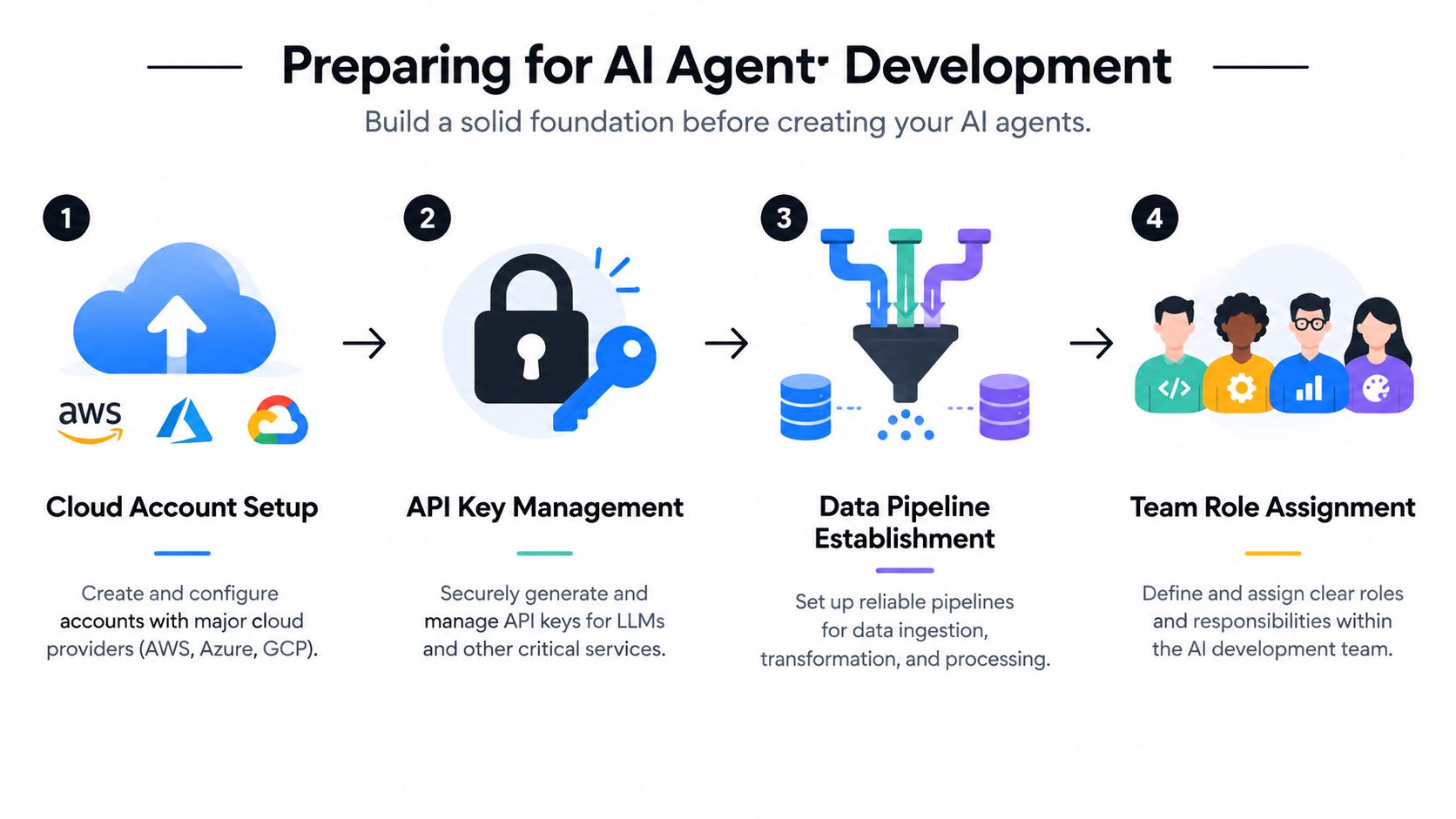
Three things should be in place early, cloud access, secure API key handling, and a clean data source for the task you want to automate. For most SMEs, that means setting up accounts with a major cloud provider, choosing a secure secrets store, and identifying the exact systems the agent will read from and write to. Keep the scope tight, one CRM queue, one inbox, one shared drive, or one internal request form.
The team roles should be explicit from day one. A sponsor approves the use case and budget, a product owner defines the workflow, a data steward checks the source data, and a technical owner handles deployment and logging. If nobody owns exceptions, the agent becomes an orphaned tool with no maintenance path.
Put governance before enthusiasm
UK teams need readiness as well as technical setup. The government's labour market survey found that 97% of respondents identified at least one AI skills gap, with 57% reporting technical skills gaps and 30% reporting non-technical skills gaps (UK Government AI Labour Market Survey 2025). That is why training and change management belong in the environment checklist, not after launch.
The team also needs a plan for adoption, not just deployment. A practical change management guide helps here, because the people side determines whether the agent gets used, trusted, and maintained. Without clear approval gates, role-based access, and a simple rollback path, even a good build can become awkward to support.
Practical rule: if you cannot explain who can approve, who can override, and who gets notified when the agent fails, you are not ready to build yet.
For SMEs, the best prep work is usually the least exciting. Document the process, write down the failure cases, and make sure the person who will support the agent after launch is in the room before build starts. That keeps the first release grounded in how the business operates, not just how the demo looks.
Designing the AI Agent Workflow
The best agent designs start with one business process, not a platform. A purchase-order approval flow is a good example because it has clear inputs, visible decision points, and a natural handoff to a manager when something looks wrong. That makes it easier to define what the agent should do, what it should never do, and where a human still needs to step in.
Break the process into bounded tasks
A useful workflow starts with a user intent, then moves through data collection, decision logic, action, and output. The agent doesn't need to “understand procurement” in the abstract. It only needs to capture the request, check the fields it needs, compare them with policy, and either approve, reject, or escalate.
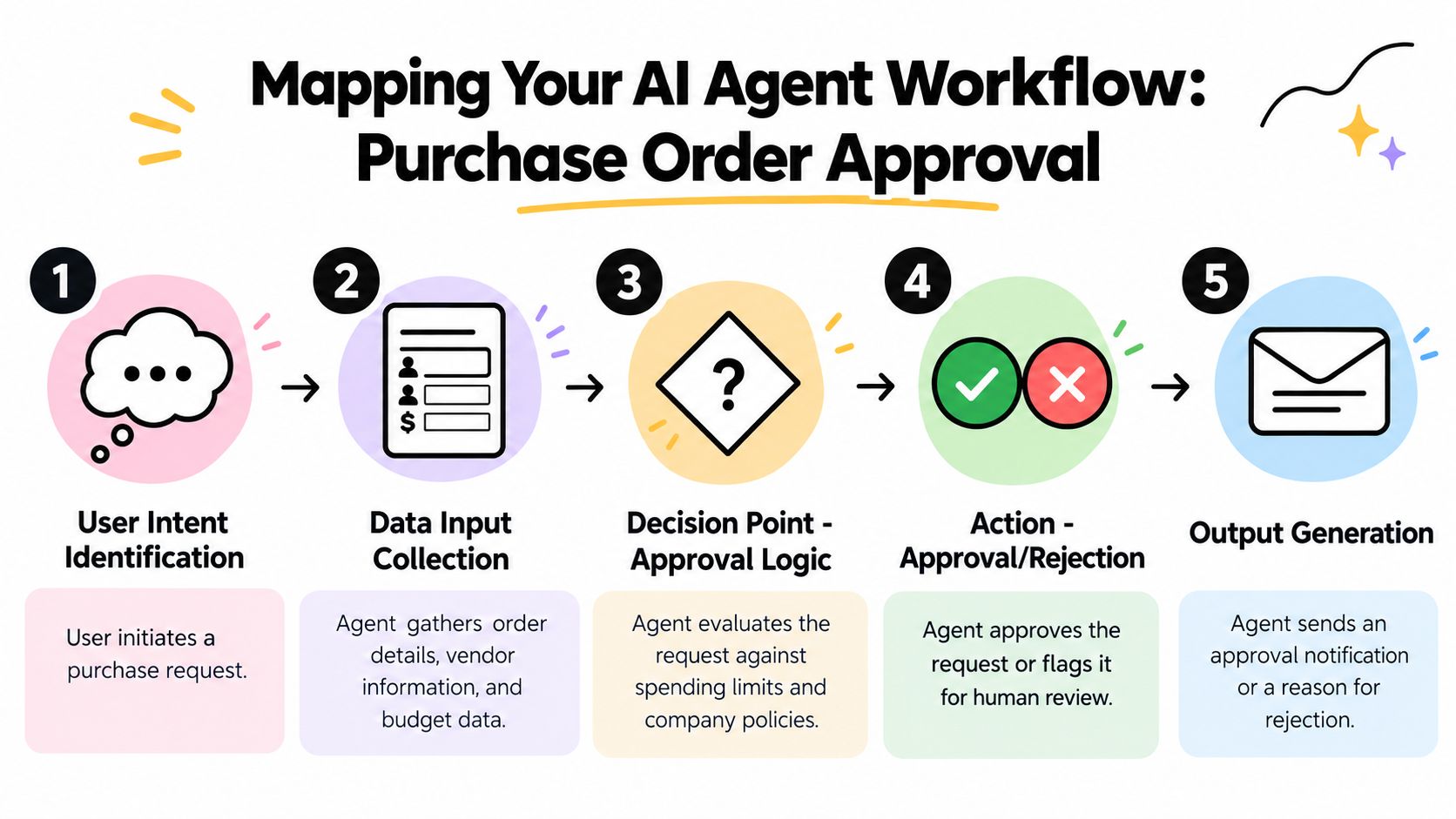
In practice, the boundary work matters more than the model choice. If the request needs a vendor name, budget code, total amount, and business reason, define those fields explicitly and reject incomplete submissions early. That prevents the agent from guessing, which is how small automation projects turn into expensive cleanup work.
Design for state, exceptions, and handoffs
A workflow only works if the agent knows where it is in the process. That means state management, such as pending, waiting for approval, approved, rejected, or sent for human review. It also means logging the exact data the agent saw, the rule it applied, and the reason it took the action it did.
A good agent doesn't try to be clever at the wrong moment. It just moves the right case to the right next step.
For this kind of build, the question isn't whether to automate everything, it's which part is safe and repeatable. Approval flows, status updates, and first-pass triage are strong starting points because they reduce back-and-forth without removing accountability. Keep the workflow narrow, then expand only after the exceptions are understood and the team has confidence in the handoff pattern.
The most effective early design sessions usually end with a single-page process map. If the map can't be understood by the person who'll use the agent every day, it isn't ready to become software.
Building and Training Your AI Agent
The build should follow the workflow, not the other way around. Choose a model for the task it must perform, then decide whether prompt engineering, retrieval, or fine-tuning is justified. For many SME use cases, the best choice is the simplest setup that still meets the reliability bar.
Connect the model to a real task
An agent needs a clear role, a bounded instruction set, and access to the data it needs for that one job. If it is drafting responses, checking requests against policy, or summarising records, start with prompts and structured inputs before you reach for fine-tuning. Fine-tuning helps when the output style or decision pattern is stable and repetitive, but it adds maintenance overhead that many SMEs do not need on day one.
Staged builds matter because agent capability is moving quickly in coding, cybersecurity, and research work, according to the UK Government AI capability assessment. Start with a supervised pilot, instrument the results, and widen the task boundary only after the agent behaves consistently.
Train against exceptions, not just happy paths
Most agent failures happen at the edges. Missing fields, conflicting instructions, outdated records, and unclear policy language cause problems long before the model runs out of capability. Build a test set from real cases, including awkward ones, and measure completion quality, error rate, and how many cases still need manual intervention.
Use a training loop that reflects production reality. If the agent drafts an approval note, test how it handles incomplete requests, borderline requests, and requests that should be rejected. If it classifies incoming messages, check how it handles ambiguity and duplicate records before anyone relies on it.
Build rule: if a human can't spot the failure mode quickly, the evaluation set is too clean.
That difference usually separates a demo from a deployable system. A demo only needs to look smart. A production agent needs to be boring in the right ways, predictable in the common cases, and transparent when it is unsure.
Integrating Agents into Existing Systems
Integration is where a lot of promising agents stall. The model might work, but if it can't safely read from the CRM, post to the ticketing system, or update the internal dashboard, it becomes another disconnected tool. The right integration pattern depends on how mature your stack is and how much change your team can absorb.
Compare the main integration options
| Integration Approach | Pros | Cons | Best For |
|---|---|---|---|
| Point-to-point scripts | Fast to prototype, low initial overhead | Hard to maintain, brittle as systems change | Very small builds and short-lived tests |
| API-first orchestration | Cleaner ownership, easier governance, better scaling | Needs more up-front design | SMEs planning a real production rollout |
| Webhook-driven workflows | Responsive, good for event-based actions | Can become noisy without strong logging | Teams with clear events and simple triggers |
For most SMEs, API-first orchestration is the safest long-term option. It keeps the logic in one place, makes permissions easier to reason about, and reduces the risk of invisible side effects. If your current environment is already messy, the goal isn't to make the agent “smarter”, it's to give it a predictable path through the systems it has to touch.
Keep authentication, logging, and failure handling explicit
Treat the integration layer as a control surface, not just plumbing. The agent should authenticate with least privilege, log every external action, and stop rather than guess if a downstream system is unavailable. That is especially important when the workflow touches customer data, finance records, or operational approvals.
If you need a partner for the integration layer itself, system integration support is the type of work that often sits alongside agent development, because the agent is only as stable as the systems around it. In-house teams can absolutely do this too, but the architecture decisions need to be deliberate, not improvised during the pilot.
The simplest test is this, can a support lead explain how the agent talks to the CRM without looking at code? If the answer is no, the integration is too opaque for production use.
Common Pitfalls and Tips to Ensure Success
A first agent can look fine in a demo and still fail in the business. The usual problem is not the model. It is weak governance, unclear ownership, or a workflow that the team cannot support once the pilot ends.
Avoid the five mistakes that kill adoption
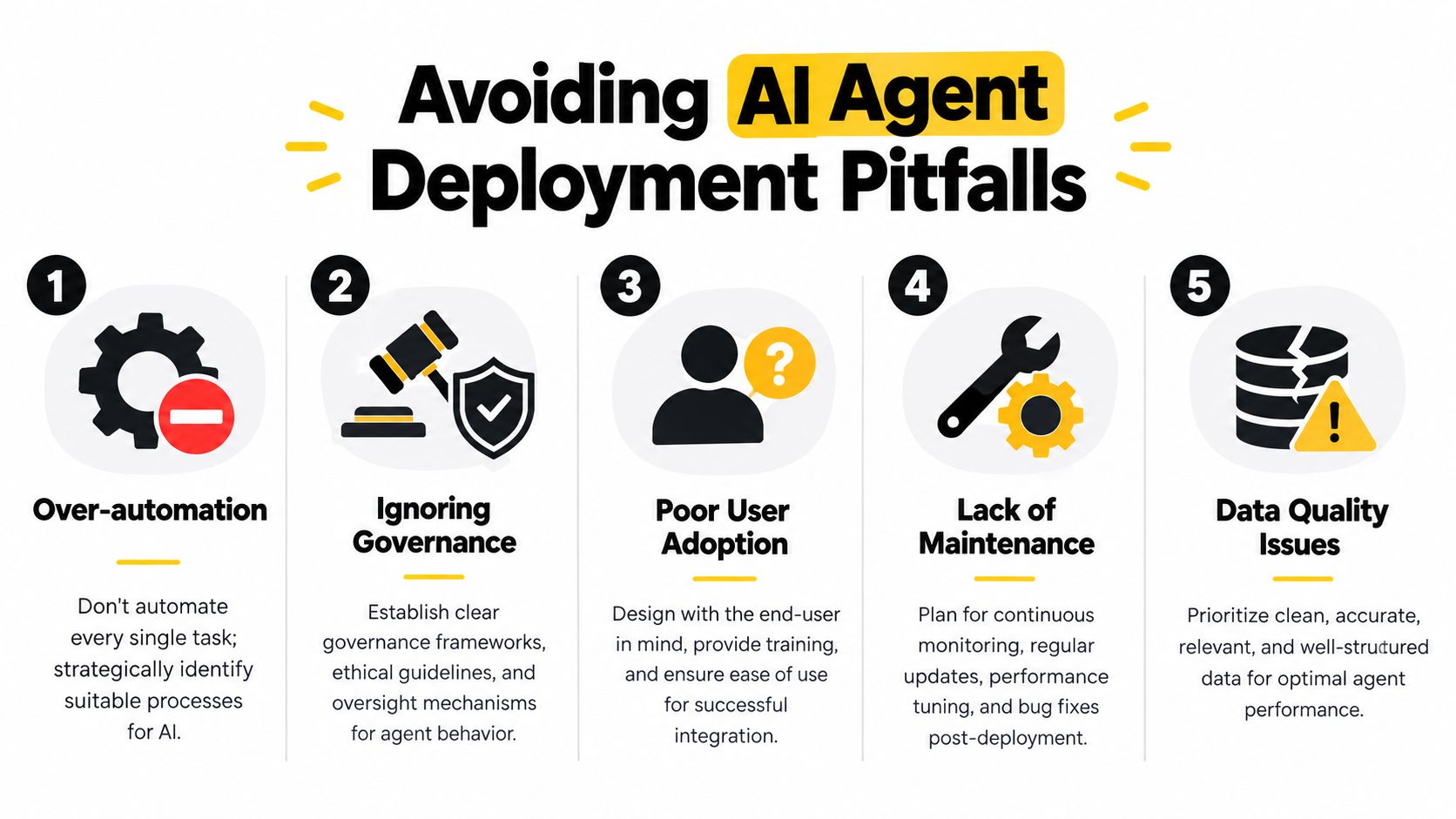
- Over-automation: Automate the repeatable, low-risk steps first. Leave judgment-heavy decisions with people until the agent has proved it can behave consistently.
- Ignoring governance: Put approval gates, audit logs, and escalation paths in place before launch. If the agent touches customer data, finance records, or operational approvals, the review path has to be clear.
- Poor user adoption: Build around the people who will use it. If the handoff feels awkward or the wording does not match the team's normal process, they will work around it.
- Lack of maintenance: Assign one owner for fixes, prompt updates, and workflow changes. Agents drift over time, especially when upstream systems or business rules change.
- Data quality issues: Clean, structured input matters more than a clever prompt. Bad source data produces bad decisions fast.
Those mistakes show up quickly in SMEs because there is less slack in the process. The wider market still has a long way to go, and that makes readiness more important than novelty. As noted earlier, analysts in the UK Government AI Labour Market Survey 2025 found that adoption is still limited across UK businesses, which is a reminder that the hard part is making change stick.
Use a rollout checklist before you go live
- Confirm ownership: one person is accountable for performance, exceptions, and updates.
- Check the logs: every external action should be traceable.
- Test the edge cases: make sure the agent handles missing, conflicting, and malformed inputs.
- Validate the handoff: humans must be able to override the agent cleanly.
- Train the users: the team needs to know what the agent does, and what it does not do.
If the rollout needs one person to rescue it every week, the design is not ready. That usually means the controls are too thin or the workflow is too hard to maintain.
For a practical governance reference, AI agents governance guidance is a useful companion to the build. It helps teams set the rules early, before the agent becomes part of day-to-day work.
Conclusion and Next Steps
A useful agent starts with a messy real workflow, not a flashy prototype. You prepare the environment, define ownership, map the workflow, build the narrowest useful version, integrate it safely, and then stress-test it against exceptions. That sequence is what turns AI from a side experiment into something your team can rely on.
The opening problem, the manager buried in manual handoffs, doesn't disappear because the model is clever. It disappears when the work is structured well enough for automation, the governance is clear enough for approval, and the team knows how to maintain the system after launch. That's the practical answer to how to build AI agents in an SME, build for adoption first, then widen capability once the first version has proved itself.
A good next move is a low-risk pilot, something repetitive, visible, and easy to measure by the people who already do it. Keep the scope tight, review the exceptions, and only scale after the workflow is stable under supervision. If you want to move faster with less guesswork, use a partner who can handle the build, the integration, and the enablement as one delivery path.
InnovaAI Integration Ltd designs custom AI agents, workflow automation, dashboards, and training for SMEs that need practical outcomes, not another pilot that stalls. If you want help turning a manual process into a governed, maintainable agent workflow, visit InnovaAI Integration Ltd to discuss a build, an automation audit, or a phased AI readiness plan.