What Is Custom Application Development: A Practical Guide
custom application developmentbespoke softwarebusiness automationsoftware integrationSME technology

Tuesday starts with the shared inbox already full. A certificate renewal is sitting on the wall planner, a tenant's message from 8pm still needs a reply, and someone is copying maintenance details from Fixflo into a spreadsheet before checking the same property in Reapit, Alto, Arthur or Qube.
That isn't a staff-effort problem. It's a process problem. The information exists, but it's split across systems, inboxes, calendars and people's memory. Custom application development means building a working layer around that reality, so your existing platforms share information and your team follows a clearer process without replacing the systems you already pay for.
Table of Contents
- Why Your Current Systems Feel Like a Struggle
- What Is Custom Application Development Actually
- How Bespoke Software Is Built Step by Step
- Custom Software Versus Off-the-Shelf Alternatives
- When Commissioning Custom Apps Makes Sense
- Starting Your Journey Toward Tailored Solutions
Why Your Current Systems Feel Like a Struggle
The typical Tuesday morning in a property business doesn't fail because nobody cares. Your property manager knows which landlord is waiting for an update. Your lettings administrator knows which tenancy is stuck. Your block manager knows that a Section 20 consultation, service charge query or contractor document needs attention.
The difficulty is that each person has to assemble the picture manually.
A maintenance request may begin in Fixflo, require a supplier check in a separate system, need landlord approval by email, and end with a note added to Reapit or Arthur. A certificate renewal may appear in a spreadsheet, while the supporting document sits in a shared folder. A serviced accommodation turnaround may depend on a channel manager, a cleaner's WhatsApp message and a booking record that nobody has joined together.
The software isn't always the problem
Reapit, Alto, Fixflo, Arthur and Qube each do useful jobs. The trouble starts when the process crosses from one platform to another.
Your team then creates workarounds:
- Spreadsheet tracking: Dates, exceptions and ownership sit outside the main system.
- Manual rekeying: The same tenant, landlord, unit or job details are typed into multiple places.
- Inbox chasing: Staff ask whether an approval happened instead of seeing the status.
- Wall planners: Important renewal dates depend on somebody checking them at the right time.
- Personal knowledge: A process works because one experienced employee remembers every exception.
That patchwork can feel manageable while the portfolio is stable. It becomes harder when you add doors, blocks, units or bookings and the number of handoffs increases.
Practical rule: If a process depends on someone copying information, remembering a date or checking three systems before acting, it's a candidate for redesign.
An explanation of API integration helps clarify the technical part, but the business question comes first. Which decision is delayed? Which record is duplicated? Which approval is invisible until somebody chases it?
The cost isn't only wasted admin. Manual handoffs create delays in tenancy progression, slower maintenance triage, missed renewal preparation, inconsistent landlord communication and more pressure on the people who already understand the operation. Hiring another administrator can absorb some work, but it often leaves the underlying process untouched.
What Is Custom Application Development Actually
Custom application development is the design, build and deployment of software for a specific organisation's workflows. It isn't just buying another app with your logo on it. It means deciding what your business needs to happen, then building the screens, rules, integrations and approval points around that process.
An off-the-shelf product gives you a defined set of functions. You configure it where the vendor allows configuration, then adapt your work to its boundaries. A custom application starts with your operation instead. It might show a property manager every open maintenance issue that needs landlord approval, pull the relevant record from Fixflo, write an approved update to Reapit, and leave the final tenant message for a person to review.
The three parts that make it bespoke
Custom features match the work your staff perform. A block management dashboard may need to group actions by block, leasehold unit, contractor and consultation stage. A letting workflow may need to distinguish tenancy progression tasks from certificate renewals.
Unique integrations connect the platforms you already run. The application might read data from Reapit, Alto, Fixflo, Arthur, Qube, a channel manager, an email inbox or a document store. The point is not to create another isolated database. It's to make information move between the tools that already hold it.
Business-specific logic captures your operating rules. That could mean routing a repair by category, asking for landlord approval above an agreed threshold, escalating an unanswered tenant message, or placing a certificate into a human review queue before anyone contacts a regulator or tenant.
It isn't a replacement platform
A sensible custom build doesn't ask you to abandon your core property system. It connects to it and fills the gap around it.
The result might be a small internal web app, an approval dashboard, an automated document workflow or a set of integrations. It can be less visible than a large software purchase, but more useful because it addresses the exact point where your process breaks.
AI may help classify a maintenance message or draft a response. It shouldn't decide a legal position, approve a compliance action or send a sensitive message without human review. A person must approve anything that reaches a tenant, landlord, contractor or regulator.
How Bespoke Software Is Built Step by Step
A custom application should be built from the process outward, not from a list of fashionable features. The first deliverable shouldn't be a polished screen. It should be a shared understanding of what happens now, where the work stalls and what information the next person needs.
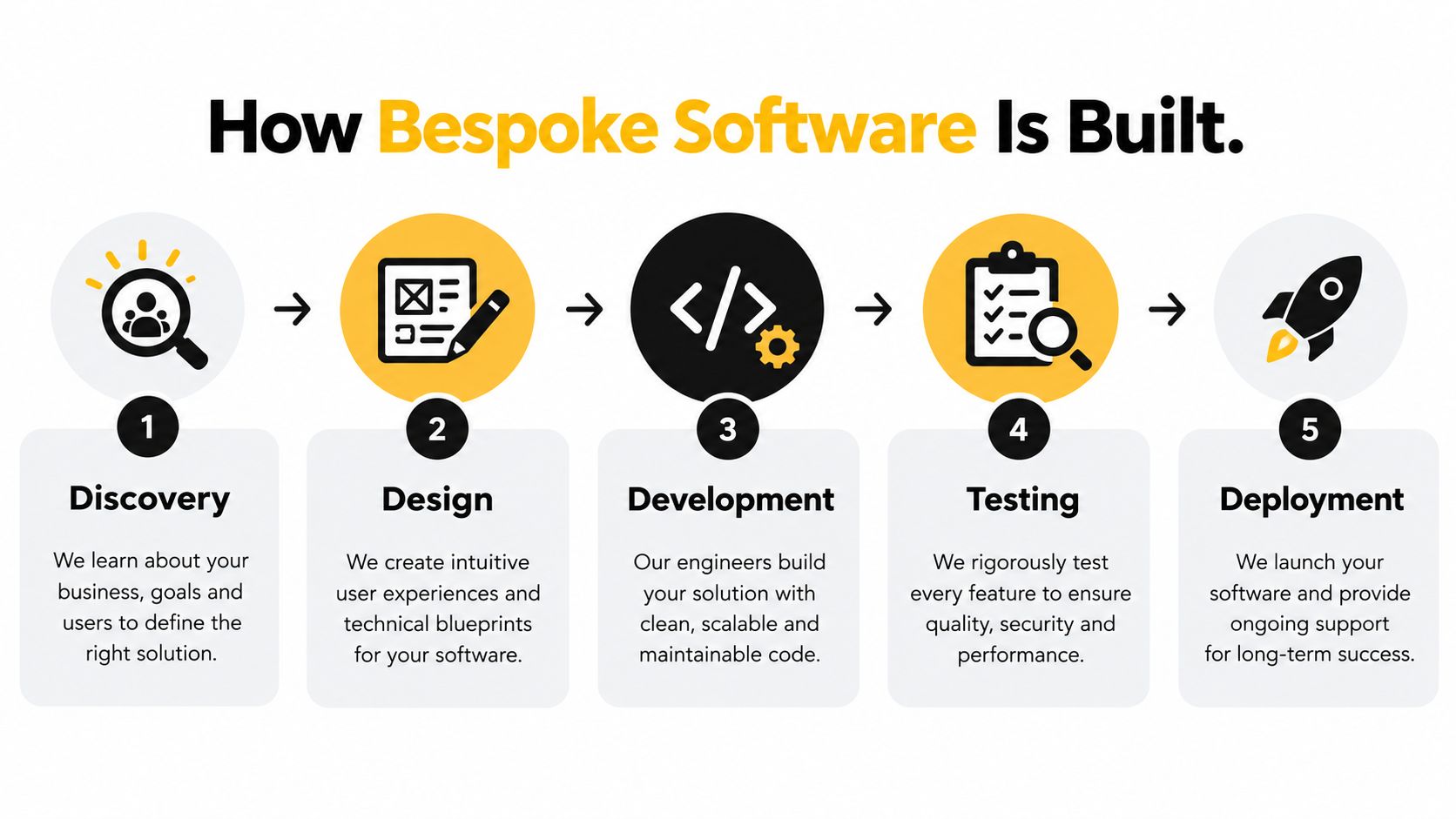
Discovery
Start with one operational problem, not the whole company. Follow a maintenance request from first contact to closure. Trace a certificate renewal from the first reminder to the final filing. Map tenancy progression from accepted offer to move-in.
Record who acts, which system they use, what they copy, what they check and where approval is required. Speak to the person doing the work, not only the person who owns the process.
Design
Design the smallest useful workflow. Decide which data comes from Reapit, Alto, Fixflo, Arthur, Qube or another system. Define what the new application stores, what it only displays, and what it is allowed to write back.
Include roles early. A property manager may see all open jobs for a portfolio. A contractor may only receive an assigned task. An owner may approve a cost. A human reviewer must approve outward messages and decisions with compliance or legal consequences.
Development
Build a working slice rather than a large promise. For example, begin with a dashboard showing unassigned maintenance requests, missing information and pending approvals. Connect it to the existing platform before adding more process branches.
Integration quality matters. A screen that looks good but shows stale, incomplete or duplicated data won't earn trust. Test how the system handles missing records, changed tenancy details, failed connections and permissions.
Testing
Use real process examples with sensitive information removed. Ask staff to complete the work as they do it on a busy day, including exceptions.
Test the business rules, not just the buttons. Check whether a duplicate repair is detected, whether a landlord approval remains visible, whether a tenant message waits for review, and whether the system records who approved an action.
Deployment
Release to a controlled group first. Keep the existing process available while staff learn the new one and compare results. Train the team on what the application does, what it doesn't do and where a person must intervene.
Then improve it from observed usage. A custom build is maintained like an operational asset. Platforms change their interfaces, staff find exceptions and your process develops as the portfolio grows.
A good build process makes trade-offs visible. If the team can't explain which workflow is changing, who approves the output and which existing system remains the source of truth, development has started too early.
Custom Software Versus Off-the-Shelf Alternatives
Application software accounts for 49.69% of UK software sector revenue in 2024, which reflects the scale of the market for practical systems that manage operations, customers and data, according to UK software development market data.
That market exists for a reason. Standard products solve common problems well. The mistake is assuming that every operational problem needs a bespoke build, or that another subscription will fix a process caused by disconnected systems.
Four realistic routes
| Option | Best For | Key Limitation |
|---|---|---|
| Off-the-shelf platform | A process that matches the product's normal workflow | Your team may need workarounds when the process differs |
| Configuration and integration | Improving an existing Reapit, Alto, Fixflo, Arthur or Qube setup | You remain within the platform's data and integration boundaries |
| Low-code or no-code | Internal forms, dashboards and straightforward approval flows | Complex rules, permissions and long-term maintenance can become difficult |
| Custom application | A valuable process with unusual rules, several systems and repeated manual handoffs | It needs proper discovery, testing, ownership and ongoing maintenance |
Low-code adoption is already widespread, with 63% of UK enterprises using low-code solutions in 2024, as reported in UK software development market statistics. That makes low-code worth considering, especially for a small internal tool or a controlled workflow.
It isn't automatically the right answer. A quick form may work well in low-code. A system that must reconcile property records, manage permissions, handle exceptions and write changes across several platforms needs more careful engineering.
What usually fails
Buying another platform without changing the process often creates another place to check. Switching from Reapit to another core system may solve a product limitation, but it also brings migration work, retraining and disruption. It may not remove the spreadsheet if the spreadsheet exists because a specific workflow was never supported.
Using ChatGPT can help a team draft a message, summarise a repair history or explore an idea. It won't, by itself, create reliable permissions, connect your records, log approvals or enforce a review before a tenant receives an answer.
A practical business process automation software guide is useful when deciding whether the first move should be configuration, integration or a bespoke application. The right choice depends on the process, not the label attached to the technology.
When Commissioning Custom Apps Makes Sense
Custom development makes sense when the operational problem is specific, repeated and expensive to keep patching. It doesn't require a huge corporate structure. The UK has over 5.5 million SMEs, so bespoke applications need to support low-friction adoption rather than assume a large technical department, as noted in the SME Digital Adoption Taskforce report.
For an independent property business, the strongest case often appears in the gap between systems. You may have enough doors, units, blocks or bookings to feel the cost of manual coordination, but not enough spare capacity to build an internal software team.
Look for repeated friction
A custom build deserves consideration when:
- The same data is re-entered: Tenant, landlord, property or contractor details are copied between platforms.
- Exceptions control the day: The standard workflow works until a landlord delays approval, a certificate is incomplete or a repair changes category.
- The operation depends on one person: A senior administrator knows which spreadsheet, inbox or wall planner contains the current status.
- Approvals disappear: A decision exists in email but not in the property record or task history.
- Your core platforms don't join up: Reapit, Alto, Fixflo, Arthur or Qube each holds part of the process.
- Growth adds coordination rather than value: Another hundred doors would mean another salary mainly because staff are moving information between systems.
The business case isn't “we should have an app”. It's a comparison between the current process and a defined alternative. Count the handoffs, identify the delays and record where errors or missed follow-ups occur. You don't need to invent a time-saving percentage. You need enough operational evidence to decide whether the build addresses a material constraint.
Property examples
A letting agency might need a tenancy progression workspace that combines offer status, outstanding documents, references, deposit tasks and move-in readiness. It should show the next action and the owner of that action. It shouldn't make legal decisions or send a tenant message without review.
A block manager might need a Section 20 preparation workflow that gathers documents, tracks stages and highlights missing approvals. A solicitor or compliance adviser should confirm how the relevant requirement applies. The application can organise evidence and reminders, but it must not replace professional advice.
A serviced accommodation operator might need a turnaround board that joins bookings, cleaning status, maintenance issues and guest communications. The channel manager remains part of the operating stack. The custom layer gives the team one view of what needs attention.
Custom software development in the UK is not automatically a better investment than hiring. Hiring may be right when the work requires judgement, relationships or physical action. A build is more suitable when capable staff are repeatedly performing predictable coordination work that software can support.
Starting Your Journey Toward Tailored Solutions
Start with one process that causes visible pain. Don't begin with “we need AI” or “we need a new app”. Begin with the task your team repeats, delays or tracks outside the system.
Write down the current route:
- Choose the workflow: Pick maintenance triage, tenancy progression, certificate renewals, service charges, client money administration, voids or turnaround.
- Follow the record: Note where information enters, where it is copied and which platform should remain the source of truth.
- Mark the decisions: Separate simple routing from decisions that need a property manager, landlord, solicitor, compliance adviser or other qualified person.
- Collect exceptions: Include incomplete documents, duplicate requests, changed details, delayed approvals and failed integrations.
- Define the first useful view: Decide what the person doing the work should see when they open the application.
- Set the approval boundary: Any message or action reaching a tenant, landlord, contractor or regulator needs a named human approval step.
- Choose the least complicated route: Check whether configuration, integration or low-code can solve the problem before commissioning a larger build.
A short operational scorecard can help you compare candidate workflows without turning the exercise into a technology project. Use the AI Readiness Scorecard as a tool for recording the process, its friction points and the information needed for a sensible next step.
Ask potential builders to show how they'll connect to what you already run. Ask who owns the data, how permissions work, what happens when an integration fails and how changes will be tested. If the proposal starts by replacing Reapit, Alto, Fixflo, Arthur or Qube without proving why, press for the operational reason.
The first build should be narrow enough for your team to use and inspect. A clear workflow, reliable integration and visible approval trail will teach you more than a large application full of features nobody has tested.
I build custom AI systems, internal applications, dashboards and integrations for property businesses through InnovaAI Integration Ltd, connecting to the platforms you already run rather than replacing them. Start by looking at one repeated handoff or approval gap, then book a free discovery call to work out whether it's even a fit, and if it isn't a fit, I'll say so on the call.