Workflow Automation Solutions That Actually Scale
workflow automation solutionsbusiness process automationworkflow integrationSME automation guide
The loudest advice about workflow automation solutions says the same thing every time: pick a platform, launch a pilot, and let the software sort out the rest. That advice is tidy, but it misses the core problem. In UK businesses, self-reported AI use has risen from around 12% in September 2023 to around 35% by 2026 among firms with 10 or more employees, yet the same official picture says most organisations are still using only a small number of AI technologies, which points to experimentation rather than embedded operational change (ONS-based analysis).
That gap matters because a pilot can look successful while daily work stays largely manual. Teams may save time on one task, but still rekey data, chase approvals, and manage exceptions by hand. The result is a familiar trap, a tool gets adopted, but the workflow never really changes.
The useful question isn't which platform has the longest feature list. It's why automation stalls after the pilot, and what kind of solution can survive real handoffs, messy data, and human review. That's the lens used here, starting with the basic idea, then moving through architectures, decision rules, practical examples, and rollout habits that help a workflow stick.
Table of Contents
- Introduction Why Workflow Automation Stalls After the Pilot
- What Workflow Automation Solutions Really Do
- Core Architectures Behind Modern Workflow Automation
- How to Decide What to Automate First
- Mapping Solutions to Real Business Problems and Processes
- Putting Automation Live Without Breaking Daily Operations
- Conclusion Your Next Steps Toward Durable Automation
Introduction Why Workflow Automation Stalls After the Pilot
Many buyers approach automation like a software shortlist. They compare screens, connectors, and templates, then assume the best tool will reshape operations on its own. In practice, the tool only performs as well as the process beneath it, and that is where many SMEs lose momentum.
The UK adoption picture helps explain why. Analysts at the ONS-based analysis found that adoption has risen sharply, while the average number of AI technologies used per adopting business only moved from about 1.4 to 1.6. That points to experimentation, not a full redesign of how work moves. It is the gap between trying a tool and changing the workflow around it.
The cost of shallow automation
Shallow automation saves time in one step and shifts friction elsewhere. A form fills itself in, but someone still checks the data. A ticket routes faster, but no one has agreed what happens when the case falls outside the standard path.
Practical rule: if a pilot still depends on people remembering the next step, it is task automation, not workflow automation.
That distinction matters because pilots often look successful while daily work stays mostly manual. The team sees one small win, but still rekeys data, chases approvals, and handles exceptions by hand. The result is a tool that gets adopted without changing how the work moves.
Once you separate isolated tasks from connected workflows, the decision becomes clearer. The question stops being whether a platform has impressive features in theory. It becomes whether it can handle triggers, rules, exceptions, and handoffs without creating another manual job in disguise.
That is the lens used throughout this guide. The next sections explain the anatomy of a workflow, compare the main architectures, and show how to decide what to automate, what to integrate, and what to leave as a hybrid process.
What Workflow Automation Solutions Really Do
At the simplest level, workflow automation solutions move work from one step to the next without someone nudging every handoff. A ticket comes in, the right station gets the order, and if something unusual happens, a chef steps in. The process is coordinated, but not rigidly blind.
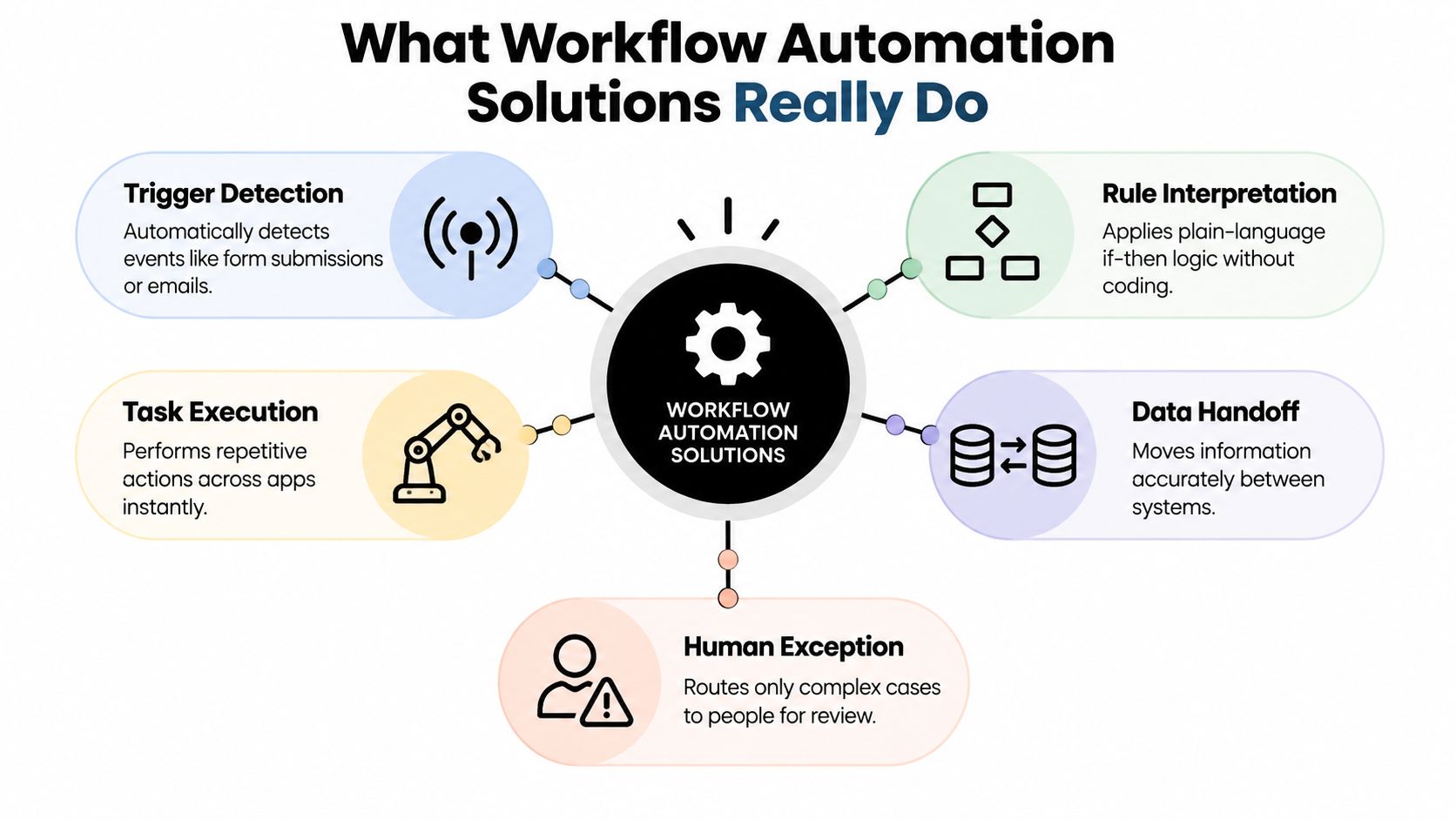
A workflow usually has five moving parts. The trigger starts the process, such as a form submission, email, or status change. Rules decide what should happen next. Execution carries out the actions, often across more than one app. Data handoff moves information cleanly from system to system. Exceptions are routed to people when the process needs judgement.
A workflow is not just a task done faster. It's a chain of actions that keeps moving with less manual coordination.
Task automation, workflow automation, and system integration
These terms get mixed together, but they do different jobs. Task automation handles one repeatable action, like sending an alert. Workflow automation coordinates several tasks in sequence, like creating a record, assigning an owner, and sending a follow-up. System integration connects the data layer, so the same information doesn't have to be typed twice.
That distinction matters because many pilots only automate the visible task. A team might auto-send an email, but still update the CRM by hand. That isn't a bad first step, but it doesn't solve the operational drag that shows up in admin time and inconsistent records.
Where human review still belongs
A good workflow doesn't eliminate people. It gives them better jobs. Humans stay in the loop for exceptions, approvals, and edge cases that need context. That's especially useful in SMEs, where the process might be partly standardised and partly messy because the business has grown around real-world exceptions.
The best solutions don't force every case down the same path. They let routine work move automatically, while unusual cases are paused and routed with enough context for a person to decide quickly. That balance is what turns automation from a novelty into something the team can trust.
Core Architectures Behind Modern Workflow Automation
Different workflow automation solutions are built on different foundations, and that choice shapes how far they can scale. A tool that's great for a simple approval chain may struggle once you add legacy software, several systems of record, or a lot of exceptions. A more integrated setup may be better for messy operations, even if it takes more planning.
| Architecture | Best For | Watch Out For |
|---|---|---|
| Rule-Based Engine | Clear, repeatable processes with stable logic | Can become brittle when exceptions multiply |
| Integration Platform | Moving data and actions across multiple systems | Needs solid governance and clean system ownership |
| AI-Enhanced Orchestration | Unstructured inputs and judgement-heavy routing | Must be controlled carefully, or it can create uncertainty |
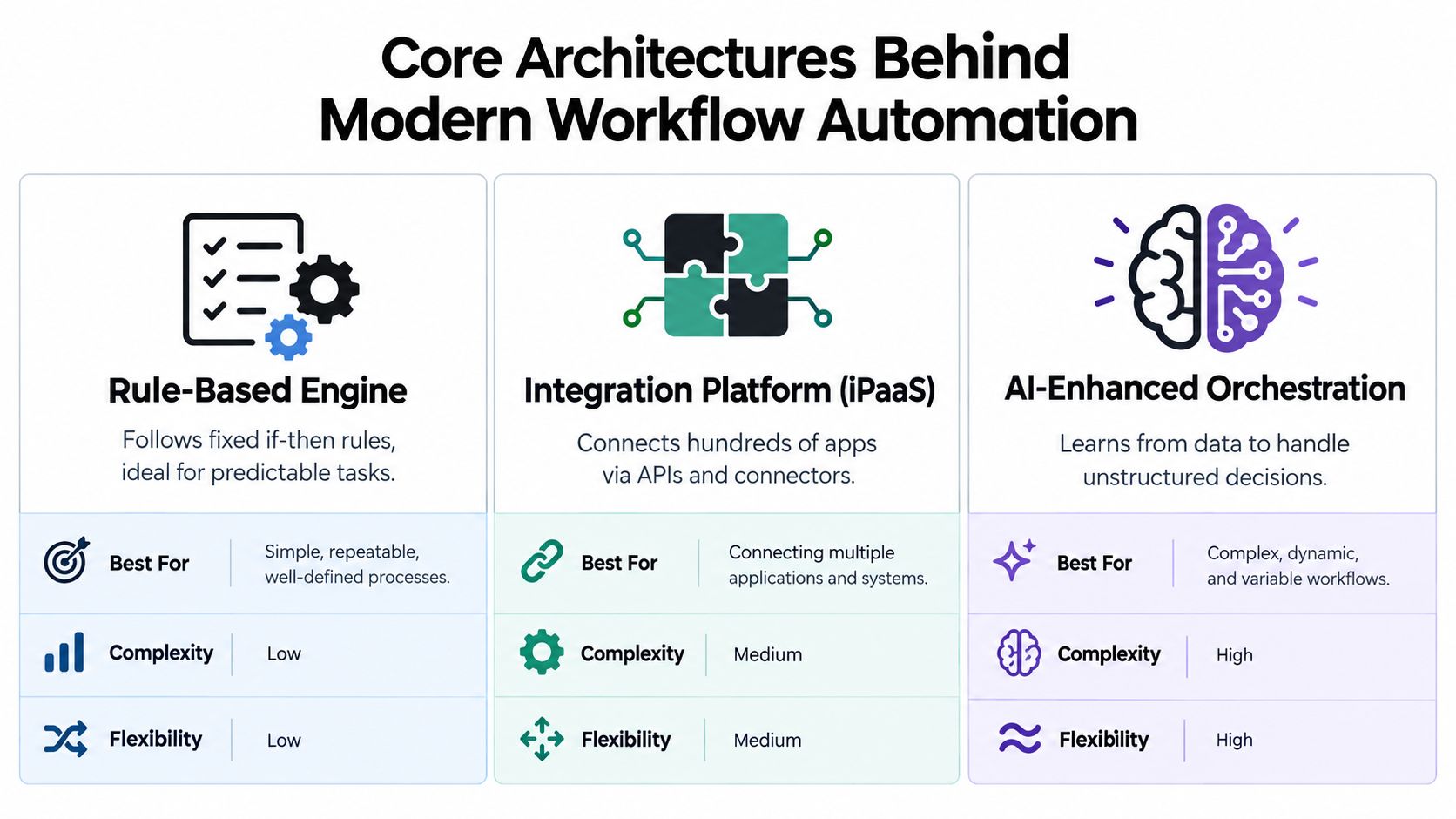
A rule-based engine is like a flowchart with a memory. If this happens, do that. It's useful when the process is stable and the decision tree is clear. The limitation is obvious, though. Once the business starts changing the rules every week, the workflow needs constant maintenance.
An integration platform does a different job. It connects systems through APIs and connectors so data can move without rekeying. That makes it a better fit when the issue is not just deciding what happens next, but keeping CRM, finance, support, and operations in sync. If your stack is already fragmented, this architecture often removes the most friction.
An AI-enhanced orchestration layer goes further by helping interpret unstructured inputs or messy decisions. That can be useful when emails, notes, or documents don't arrive in a neat format. The trade-off is governance. If people can't explain why a path was chosen, confidence drops fast.
For teams that want to compare integration-heavy approaches more closely, the system integration software guide is a useful companion. It helps separate simple app connections from the kind of orchestration that supports process ownership.
Which architecture fits which workflow
| Architecture | Best For | Watch Out For |
|---|---|---|
| Rule-based engine | Approvals, reminders, standard routing | Rigid logic in changing processes |
| Integration platform | Lead-to-customer, order-to-cash, onboarding | Poorly governed data flows |
| AI-enhanced orchestration | Classification, triage, exception support | Hard-to-audit decisions |
The main point is simple. The architecture should match the nature of the work, not the fashion of the market. If the process is predictable, keep the logic predictable. If the process spans systems, prioritise integration. If the process depends on interpretation, add AI only where it helps, not everywhere it can.
How to Decide What to Automate First
The best automation candidates aren't always the biggest or the most visible. They're the processes where repetition, delay, and rework keep showing up together. That's why many SMEs get better results by scoring workflows rather than chasing the loudest pain point.
A practical filter starts with five questions. How often does the process repeat? How clear are the rules? What happens if someone makes a mistake? How much time does the team lose? And can the current systems connect without a lot of custom work? Those questions are more useful than a platform demo because they map directly to effort and payback.
A simple decision score
Give each workflow a rough score from 1 to 5 for each factor.
- Frequency: Does this happen every day, every week, or only once in a while?
- Rule clarity: Can the steps be written as yes-no logic without constant judgement?
- Error cost: Does a mistake create wasted time, compliance risk, or customer friction?
- Time drain: Are people losing time across several roles, not just one person?
- System readiness: Do your tools already have a sensible way to connect?
That scoring approach works because it separates automation candidates from integration candidates. A process with clear rules and high repetition is often a good early win. A process with messy handoffs and weak system access may need integration first, because automation without good data just moves the problem faster.
Useful test: if a process can't be described clearly on one page, it probably needs mapping before automation.
Automate, integrate, or keep hybrid
Many buyers save themselves from disappointment this way. If a workflow is repeatable but messy across systems, integration may come first. If the process is predictable but still needs occasional human judgement, a hybrid workflow is usually smarter than full automation. If the process is low volume and heavily exception-driven, manual handling may still be the right choice.
That's also why tools should be judged against the workflow, not the other way round. For a broader view of the market, the best workflow automation tools overview can help you compare options without losing sight of the process fit.
A good shortlist usually contains only a few items. One may be a fast automation win. One may need integration. One may stay hybrid until the data or the process matures. That's a stronger outcome than forcing everything into the same platform because it protects the team from brittle systems that look impressive in a demo and fail in day-to-day use.
Mapping Solutions to Real Business Problems and Processes
The clearest way to judge workflow automation solutions is to trace a real process from start to finish. The question isn't “Can this tool automate something?” It's “Can it support the way this business works, including the awkward bits?”
Lead capture to CRM follow-up
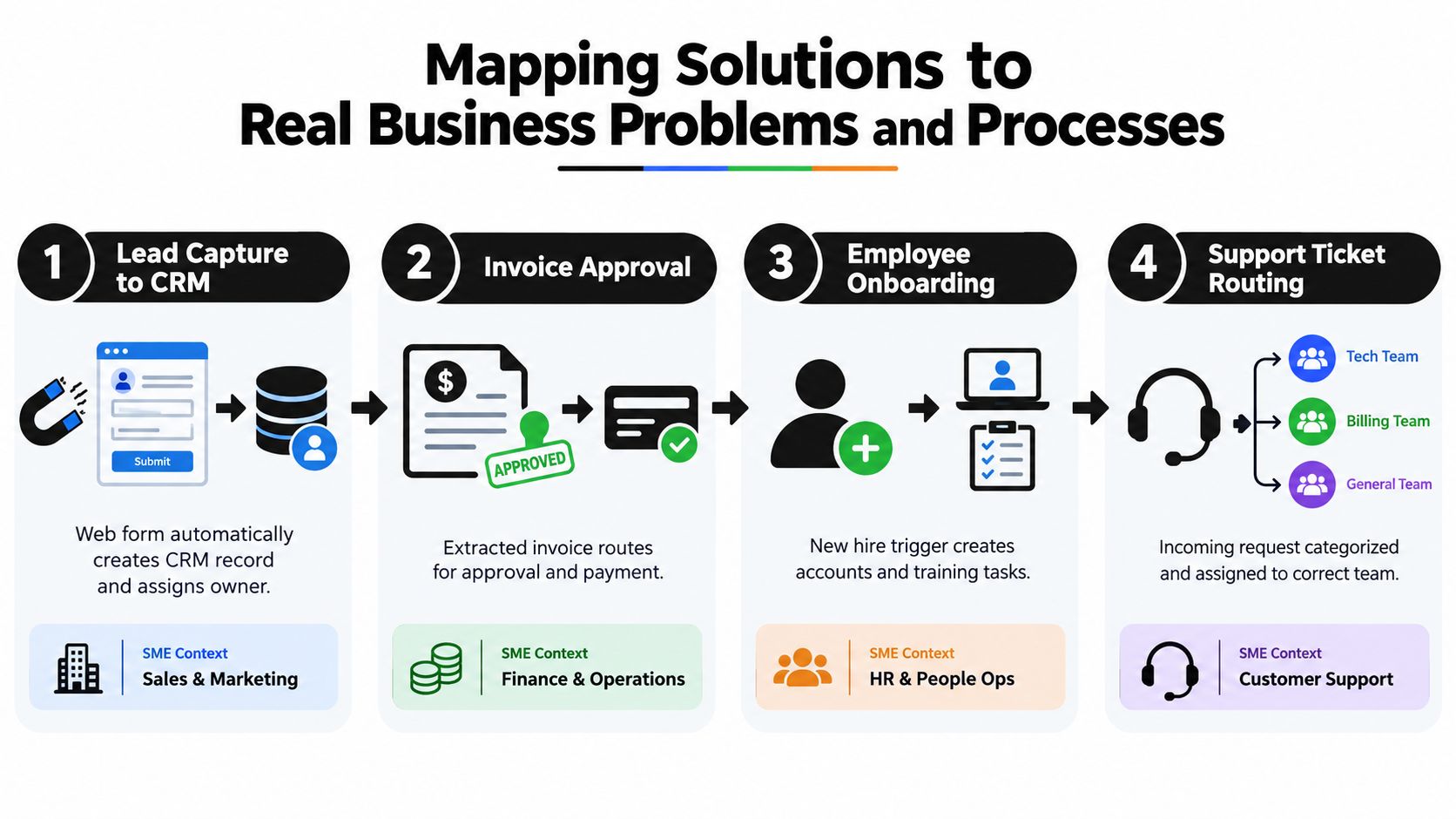
A web form creates a lead, but the work starts after that. The record needs to be placed in the CRM, assigned to the right person, and followed up without delay. If the team still copies data by hand, the process is only half automated.
A good setup links the form, CRM, and notification steps together. If the lead is incomplete, the workflow can route it for review instead of pretending everything is fine. That keeps sales from chasing bad data and gives management a cleaner view of what's coming in.
Invoice approval and payment
Invoice workflows often break because the approval step lives in one app and the finance record lives in another. That leads to duplicate checks, scattered email chains, and unclear ownership. A connected workflow can extract the invoice details, route the approval, and update the payment status in one chain.
The important part is not just speed, it's traceability. Finance teams need to know where the request is, who approved it, and what happened when an exception appeared. That's where dashboarding and approval logs become part of the solution, not an extra nice-to-have.
Employee onboarding and support routing
Onboarding is a good example of a workflow that feels simple until you map it properly. A new starter can trigger account creation, document requests, training tasks, and internal notifications. If HR, IT, and line managers all work from separate lists, small delays compound quickly.
Support routing is similar. A request comes in, gets categorised, and should land with the right team. If the issue is unusual, it should be escalated with context, not dumped into a queue. That's the difference between automation that reduces admin and automation that creates new admin.
What custom fit looks like
Off-the-shelf workflows often assume the business process is neat. SMEs usually aren't neat. Systems are older, teams wear multiple hats, and exceptions happen often enough that a rigid template can become a burden.
That's why a custom-built approach can make more sense than a generic one. InnovaAI Integration Ltd designs automation, dashboards, and integrations around how teams work, which is useful when the goal is to fit the process rather than force the process to fit the tool. The practical test is whether the workflow survives handoffs, exceptions, and change without constant manual rescue.
Putting Automation Live Without Breaking Daily Operations
A rollout usually fails for one of three reasons. The team wasn't clear on the process, the data wasn't ready, or nobody owned the exceptions once the workflow went live. Those problems rarely show up in a demo, but they appear immediately in real operations.
A sensible deployment starts with discovery. One manager, one operations lead, and one person who does the work should map the current process in plain English. That map needs to include who starts the workflow, where data comes from, where approvals happen, and what happens when something goes wrong.
A realistic SME rollout
A Midlands services firm might begin with one workflow, such as new enquiry follow-up. The team maps the process, confirms which fields are required, and defines what happens when a lead is incomplete. Then they pilot the workflow with one channel before scaling it to the rest.
The pilot works because the team doesn't treat automation as a hidden IT change. They document the steps, train staff on when to trust the workflow, and keep a manual fallback for edge cases. That last part matters. If people are scared to use the new process, they'll bypass it and go back to email.
Adoption depends on ownership
Change management is not a separate project. It's part of the build. The people who will use the workflow need to understand what changed, why it changed, and who to ask when something looks wrong. If those answers aren't easy to find, usage drops.
For teams looking at the people side of rollout more closely, the change management skills guide is a useful reference. The underlying lesson is straightforward, training has to be embedded, not bolted on after go-live.
If the team can't explain the new workflow in their own words after launch, the implementation isn't finished.
The strongest rollouts also keep documentation simple. A one-page process note is often more useful than a long technical manual. People need to know the trigger, the expected path, the exception route, and the owner. When that is clear, the workflow becomes part of daily operations instead of a special project people have to remember.
Conclusion Your Next Steps Toward Durable Automation
Durable automation doesn't come from buying the flashiest platform. It comes from matching the solution to the process, then designing for the messy parts, the handoffs, the exceptions, and the places where humans still need to decide. The UK adoption gap makes that clear, widespread use doesn't automatically mean embedded workflow change.
If you're deciding what to do next, keep the shortlist small. Pick one process that repeats often, one that has clear rules, and one that touches a system your team already trusts. If the process is too messy for straight automation, integrate first. If judgement still matters at key points, keep it hybrid until the workflow is ready for more.
A practical 30 to 90 day plan looks like this. Map one workflow in plain English. Score it for frequency, rule clarity, error cost, time drain, and system readiness. Then choose whether to automate, integrate, or leave it hybrid based on what the process needs.
The teams that succeed aren't the ones with the most tools. They're the ones that build workflows people can follow, maintain, and improve without starting over every time the business changes.
If you want a bespoke route into workflow automation solutions that fits your systems, team, and day-to-day admin, InnovaAI Integration Ltd designs custom automation, integrations, dashboards, and practical training for SMEs. They work with businesses that need automation to survive real operations, not just a pilot, and they can help you plan a rollout that sticks.