What Is Workflow Automation and How It Helps SMEs
what is workflow automationworkflow automation benefitsworkflow automation examplesSME automation guide
You're probably living some version of this right now. A manager forwards the same customer query twice, finance chases a missing approval, someone copies data from one system into another, and a spreadsheet becomes the unofficial source of truth by lunchtime. The work gets done, but only after too many hand-offs, reminders, and little fixes that drain the day.
That's where workflow automation starts to matter. It's not a shiny software buy, and it's not just about making one task faster. It's about redesigning repeatable work so information moves through your business with less chasing, fewer errors, and clearer ownership.
For UK SMEs, that shift is already becoming normal rather than niche. By late September 2025, 23% of UK businesses reported using some form of AI technology, up from 9% in September 2023, and 58% of UK SMEs were using some form of process automation in 2025, compared with 41% in 2023 (UK AI workflow automation marker). The point isn't that every firm needs advanced AI. The point is that more teams now expect routine work to move automatically where the rules are stable.
Table of Contents
- Introduction to Workflow Automation for Busy Teams
- What Workflow Automation Really Means in Plain English
- Key Building Blocks That Make Automation Work
- How Automated Workflows Compare to Manual Processes
- Common Workflow Automation Patterns and Real Examples
- Benefits Pitfalls and When Not to Automate
- Next Steps to Get Started with Workflow Automation
Introduction to Workflow Automation for Busy Teams
A lot of SME leaders spot the problem in the same place, admin. Someone spends the morning copying data between systems, the afternoon chasing approvals, and the evening checking whether the right version of a document got signed off. The business is busy, but not always productive.
Workflow automation helps you redesign that repeatable work so the next step happens without someone manually pushing every stage. It works best where the path is stable, the rules are clear, and exceptions can be handled in a defined way. In the UK public sector, the government's shared services strategy described automated approvals for rule-based decisions and automatic transfer of single inputs across multiple systems by March 2021 (UK shared services strategy).
For SMEs, the point is practical. You want fewer bottlenecks, faster turnaround, and a way to keep work moving when the team is under pressure. Automation only pays off when the underlying process is clear enough to standardise, like a production line with marked checkpoints rather than a pile of loose tasks.
Practical rule: if your team can describe a process the same way every time, automation usually has something to work with.
That is why invoice processing, employee onboarding, and customer service triage come up so often in UK business automation coverage. They are ordinary operations, which is exactly why they suit automation. A source set behind this topic noted that 31% of businesses had fully automated at least one function (UK automation adoption marker).
The question is not whether the software looks modern. It is whether your recurring work has enough structure to run reliably, and enough exception handling to avoid breaking when something unusual happens. Some businesses automate too early and end up codifying a messy process. Others wait until the routine is so clear that automation keeps it consistent.
This guide starts with the plain-English meaning of workflow automation, then moves into the parts that make it work, how it compares with manual handling, the common SME patterns, where projects go wrong, and how to judge what is worth automating first.
What Workflow Automation Really Means in Plain English
A busy team feels this first. An enquiry arrives, someone copies details into a spreadsheet, another person checks it, and a third person waits for the next hand-off. Workflow automation removes those manual nudges, so the work moves through agreed checkpoints on its own, with a person stepping in only when judgement is needed.
Workflow, task, and process
A task is one action, such as sending an email or updating a record. A workflow is a linked sequence of tasks with rules and hand-offs. A process is the wider business outcome that may include several workflows, such as taking a lead from first contact to payment and delivery.
That difference matters because many people use “automation” for any digital shortcut. Scanning a paper form into a shared folder is digitisation. Auto-routing that form to the right approver, checking required fields, and notifying finance once it is approved is workflow automation.
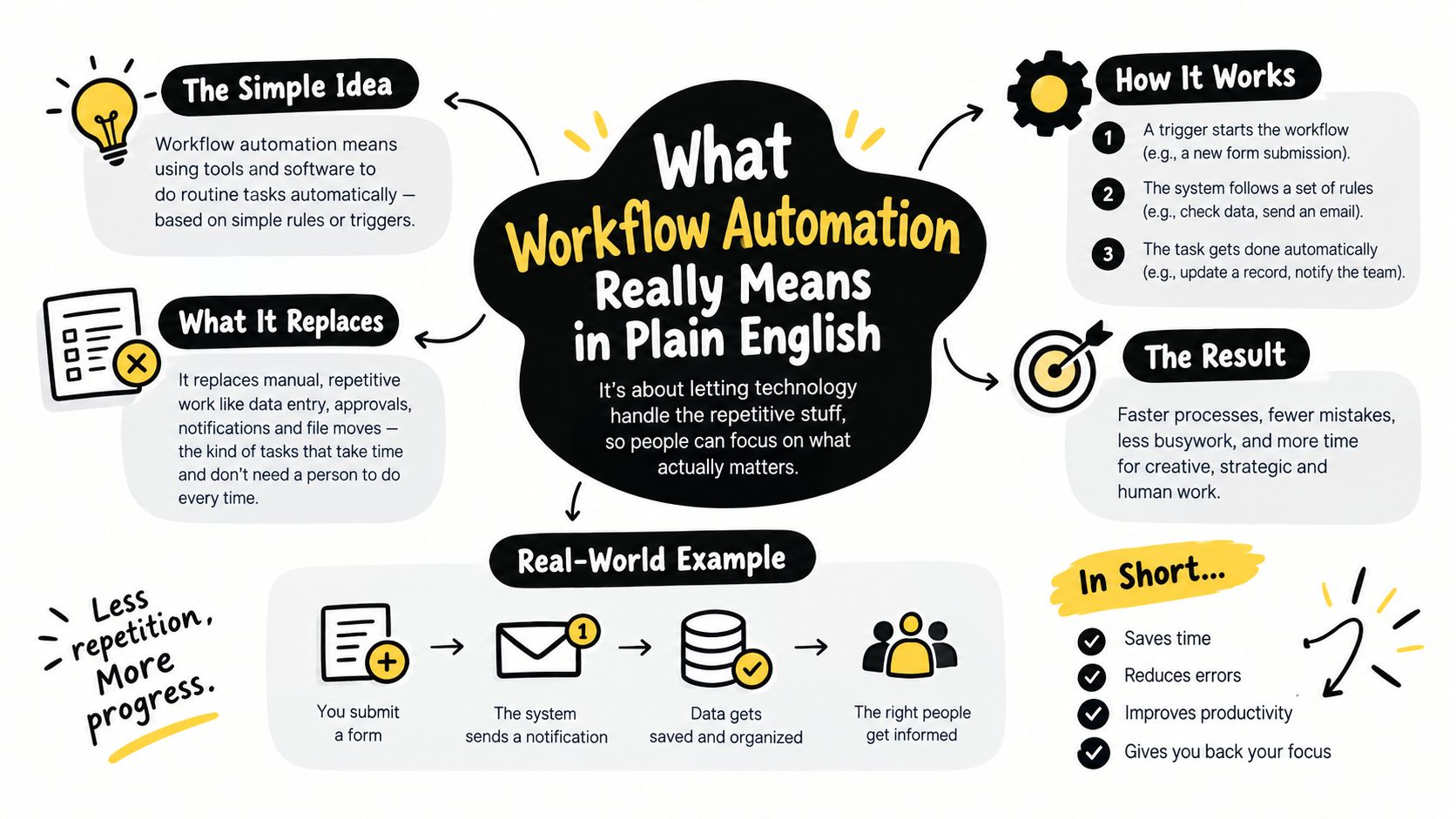
The idea stays simple even if the software feels technical. A trigger starts the flow, logic decides the next step, and the system carries out actions across one or more tools. That is why workflow automation often connects systems rather than sitting inside one app. It acts as the coordination layer.
Orchestration is the part people miss
The UK government's AI publication describes agentic workflow as coordinating tasks across systems rather than just digitising forms (GOV.UK AI insights on agentic workflow). That distinction helps because it separates “doing a task electronically” from “moving work through a chain.”
A simple test makes this clearer. If someone has to copy the same data into three tools, chase the next step by email, and remember who owns the exception, the process is still manual. If the system moves the data, routes the next action, and shows only the cases that need judgement, that is workflow automation.
For SME leaders, the point is process engineering, not software shopping. The tool matters, but only after the steps are stable enough to standardise and the exceptions are clear enough to handle without breaking the flow.
Workflow automation is the set of rules that tells a system what to do next, and when to stop and ask a person.
Key Building Blocks That Make Automation Work
The strongest automation projects usually share the same shape underneath. They start with a few simple parts that make work predictable, easy to trace, and simpler to improve later. Miss one part, and the whole setup becomes a brittle shortcut.
The logic layer matters more than the tool
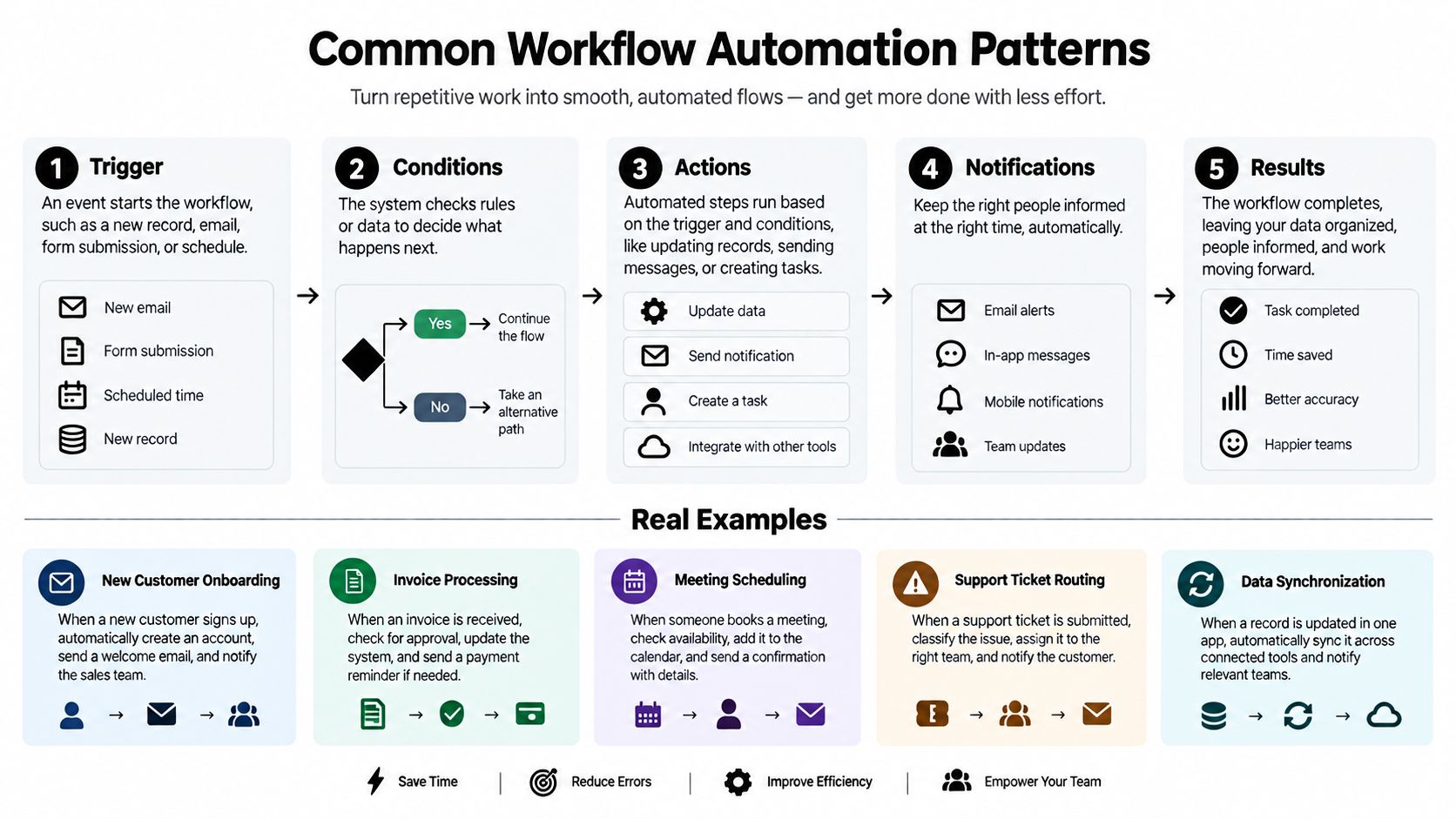
Automation works best when the process is clear before any software is chosen. A useful way to break it down is triggers, conditions, actions, states, and exceptions. A trigger starts the workflow, such as a form submission or a completed approval. Conditions decide which path to take, actions do the work, states show where the item sits in the process, and exceptions catch the odd cases that need human review.
That structure is why process modelling matters. The UK government's AI guidance on complex transactions describes a very large volume of citizen-facing work and a high share of repeatable tasks that can be handled automatically. The lesson for SMEs is simple. The return comes from identifying repeatable decision steps, not from automating a vague activity.
The same rule applies in everyday operations. If the approval path changes every week, automation keeps breaking. If the process has stable rules, a clear owner, and a defined exception route, it can keep working as the business grows.
People stay in the loop where judgement matters
A common mistake is treating automation as a way to remove people entirely. The better model is to let the system handle routine steps and keep people for edge cases, sign-off, and unusual risk. That matters in customer service, finance, and compliance, where the exception often matters more than the average case.
A practical design question helps here. What happens when the process does not fit the rule? If that answer is unclear, the workflow is not ready. If the answer is explicit, the automation is easier to trust because everyone knows where the human checkpoint sits.
The broader point shows up in UK automation analysis too, which links value to process design rather than to the gadget itself (Turing Institute analysis). SMEs get better results when they map the workflow first, then decide what should be automated, integrated, or left with a person.
That is also how many firms package the work in practice. workflow automation solutions usually start by mapping the process, then deciding which steps belong in software and which still need human judgement.
How Automated Workflows Compare to Manual Processes
A manual process can work well in a small team, especially when the task is rare or the rules keep changing. Once the same work starts repeating, the weak points show up quickly. Emails get missed. Steps get done twice. Different people handle the same case in different ways.
Automated workflows are less flexible, but that consistency is the point. They follow the same rules every time, so routine work moves in a predictable order and fewer hand-offs get lost.
| Criteria | Manual Process | Automated Workflow |
|---|---|---|
| Speed | Depends on inboxes, reminders, and who is available | Moves as soon as the trigger and rules are met |
| Errors | More exposed to re-entry mistakes and missed steps | Reduces re-entry and applies the same checks each time |
| Visibility | Progress is often hidden in email threads or spreadsheets | Status is easier to track in one place |
| Compliance | Harder to prove who did what and when | Easier to maintain a consistent audit trail |
| Scalability | Usually needs more people as volume rises | Handles more volume without adding the same amount of manual effort |
The difference is process discipline, not software choice. A workflow only performs well if the underlying process is stable and the exception route is clear. If the rules change every day, automation becomes a brittle shortcut. If the rules are settled and the edge cases are defined, it behaves more like a controlled assembly line.
The UK government's shared services strategy makes that point in practical terms, and a Capita and HMRC example shows why the design matters. The example reports that robotic process automation can bring together data from 20 systems, save up to 6.5 hours per case, and free 105 FTE a year for higher-value work (UK shared services strategy). Those figures are public-sector specific, but the lesson still applies to SMEs. The value comes from removing repeated manual hand-offs across the chain, not from speeding up one isolated step.
Where the manual model breaks first
Manual processes usually fail first under volume, when people cannot keep pace with the queue. They also drift when different staff members make slightly different decisions on the same case. Traceability is the third weak point. If the work lives in inboxes and spreadsheets, it is hard to show what happened and why.
Automated workflows help most when the work is repetitive, rule-based, and easy to measure from start to finish. Each step can trigger the next one instead of waiting for someone to spot it. That shortens cycle time and leaves your team with less paperwork to move, and more time for exceptions, customer questions, and decisions that really need judgment.
Common Workflow Automation Patterns and Real Examples
The clearest way to understand workflow automation is to follow ordinary SME tasks from start to finish. These jobs are rarely exotic. They are the repeated hand-offs, checks, and approvals that teams already do every day. The difference is that once the process is mapped properly, the work moves with fewer interruptions and less chasing.
Finance and onboarding are common starting points
Invoice processing is a natural first fit. A supplier invoice arrives, the system reads the key details, checks them against purchase records, and sends anything unusual to finance for review. The person still stays involved, but they are no longer carrying the document from desk to desk.
Employee onboarding works the same way. One person enters the new starter details once, then the workflow can trigger account creation, notify IT, alert payroll, and send the right forms to the manager. That cuts down on repeated data entry, which is often where onboarding slows down.
Customer service triage follows a similar pattern. A ticket comes in, the workflow checks the subject, priority, or account status, then routes it to the right queue. The team still handles the issue itself, but the sorting no longer depends on someone manually watching the inbox.
Lead handling and approvals need clean hand-offs
Sales and operations teams often feel the pain most clearly in approval routing. A request arrives, the system checks whether the required details are present, then sends it to the correct approver based on size, department, or risk. If the request does not fit the rule, it goes to a person instead of sitting in limbo.
That kind of structure is why workflow automation has spread through more UK businesses. The source set notes that 31% of businesses had fully automated at least one function, with invoice processing, employee onboarding, and customer service triage among the common use cases (UK automation adoption marker). Those are practical entry points because the inputs are usually clear and the rules do not change every day.
A good sign that a workflow may be ready for automation is a hand-off between two teams where one finishes and the other waits. That waiting time is often the first place where a mapped process starts to save effort.
Start with work that already has a rough script. If the process is still being invented on the fly, automation usually arrives too early.
One design habit that keeps projects useful
The strongest examples share one habit. They separate the normal path from the exception path. Routine cases flow automatically, and odd cases go to a person with enough context to act quickly. That balance turns automation into a dependable operating method, not just a software purchase.
Benefits Pitfalls and When Not to Automate
A workflow is ready for automation only when the process behind it is steady enough to hold. If the steps are still being argued over, changing every week, or full of hidden exceptions, software will not tidy things up. It will just speed up the confusion.
The upside is real, but only on the right work
The clearest benefits are practical. Teams spend less time on repetitive data entry, keep a cleaner record of what happened, and move tasks between departments with less chasing. They also see where work slows down, which matters in businesses with approvals, hand-offs, and people waiting on each other.
The UK context shows why this matters for SMEs. The country has 5.5 million SMEs employing 60% of the private sector workforce, but only 58% reportedly use any process automation in the cited source set (UK SME automation gap). That gap points to a lot of manual coordination that could be trimmed back where the rules are already clear.
Automation helps most where one team finishes and another is waiting for the same information. In that situation, the process behaves like a relay race with a dropped baton. A mapped workflow can pass the work cleanly and keep it moving.
The wrong processes create brittle systems
The main mistake is automating work that changes too often. If a process depends on judgement, shifting policy, or creative problem-solving, software can force people into clumsy workarounds. Rework goes up, and confidence in the system drops.
Governance and compliance matter here too. UK guidance in 2026 flags issues such as lawful basis for processing, privacy notices, data minimisation, and deletion processes when tools create copies across platforms (UK data protection and AI governance guidance). If automation moves personal data between systems, the business needs to know where that data goes, who can see it, and how it is removed later.
If you cannot explain the exception path, the process is not ready for automation yet.
A simple test before you automate
Use this filter before you invest time or money:
- Stable rules: The process behaves the same way most of the time.
- Clear owner: One team is responsible for the outcome.
- Visible volume: The work happens often enough to justify redesign.
- Known exception cases: Odd situations can be routed cleanly to a person.
- Audit need: You would benefit from a clearer record of each step.
That checklist is why many pilots look good in a demo and stall later. The software may work, but the business process is not ready to run on its own. People also need to change how they work, which is why change management skills belong in the project from the start, not as an afterthought.
Next Steps to Get Started with Workflow Automation
A good first step is to treat automation as process engineering, not a software purchase. Start with one real workflow and map what happens, including the detours people use to keep work moving. That gives you a clear picture of where rules are stable, where hand-offs repeat, and where a person still needs to step in.
Use a simple readiness check before you build anything:
- Map the process. Write down each step, the owner, and where work slows down.
- Count the hand-offs. Repeated copying between systems usually signals wasted effort.
- Check the rules. Processes with clear conditions are easier to automate than work that changes all the time.
- Review compliance. Confirm data handling, approval records, and retention needs before the workflow goes live.
- Plan the exception route. Human review should be built into the process from the start.
This is why stable chains matter more than a long list of features. GOV.UK AI insights on agentic workflow points to repeatable, high-volume process chains as the best fit for automation, which matches the situation many SMEs face. If a process keeps changing, the automation will keep needing repairs.
Choose tools after the process is defined. The wrong platform can slow a good idea down, while a well-mapped workflow is usually easier to implement and maintain. If you are comparing options, best workflow automation tools is useful once you know what the workflow must do.
The main point is straightforward. Workflow automation works best when it removes manual movement from stable, repeatable work and leaves judgement where people still need to use it.
If you want help mapping a process before you buy any software, InnovaAI Integration Ltd works with UK SMEs on discovery, workflow design, automation builds, and team enablement. Visit InnovaAI Integration Ltd to discuss a practical automation project for your business.